
Connection error with Metricool from the mobile app (Android)
Updated 4 months ago
If you see a Connection with Metricool error when logging in or using the app, it means the app cannot reach our servers. This can happen even when your device shows a working internet connection or reports that mobile data is available.
Check your network and device-level blocks
Start by ruling out network and device blocks that prevent the app from connecting, even if other apps work fine.
If you are on Wi-Fi, switch to mobile data. Some corporate, public, or hotel networks block the domains the app needs.
Disable any active VPN. VPNs can route traffic through regions or filters that block metricool.com.
Check whether a firewall, antivirus, or security app on your device is blocking Metricool.
Check Private DNS settings
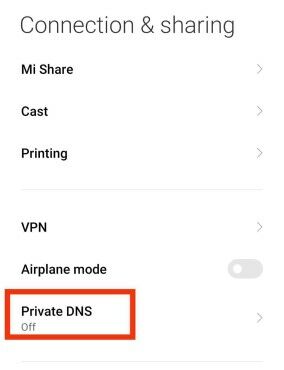
A private DNS configuration can block Metricool even when your internet connection is otherwise working. Make sure nothing is configured:
Open your Android Settings and go to Connection (the exact path may vary slightly depending on your device).
Check Private DNS and ensure it is off or empty.
Clear the app cache and force stop
Corrupt temporary files can cause connection failures without affecting other apps. Clear the cache and restart the app:
Open Settings > Apps and tap Metricool.
Tap Storage or Storage & cache, then tap Clear cache.
Tap Force stop, then reopen Metricool and try logging in again.
For full step-by-step instructions, see How to clear the Metricool app cache. Your brands, connections, and account data remain stored on our servers.
Update system components and the app
Metricool relies on Android System WebView and Google Play Services. If these are outdated or their caches are corrupt, the app may fail to connect.
Update Android System WebView from the Google Play Store.
Clear the cache for Google Play Services: Settings > Apps > Google Play Services > Storage > Clear cache.
Update the Metricool app to the latest version from the Play Store.
💬 Need help? If you still can't connect after trying the steps above, contact us via chat or at [email protected]
Related articles