
How to log in to Metricool from the website
Updated 6 days ago
Logging in to Metricool allows you to access your account from any web browser to manage your social networks, analyze metrics, and plan content. You can quickly log in using your Google account, Facebook account, or your email address and password.
If this is your first time using Metricool, make sure you have activated your account by clicking the link you received by email when you signed up.
Good to know
Activation email: sent when you sign up with an email address. Click its link to activate your account before your first login. To get it again, contact support through the chat or at [email protected].
Login verification code: a 6-digit code Metricool emails you when you log in from a new device or location, if you don't have two-factor authentication enabled. Request a new one every 30 seconds with "Didn't receive the code? Resend code" on the login screen. See Email verification code for new device or location for full details.
New sign-in notification: an email Metricool always sends when you log in from a new device or location, with the date, device, and approximate location. It's informational and is sent whether or not you have two-factor authentication enabled.
Log in step by step
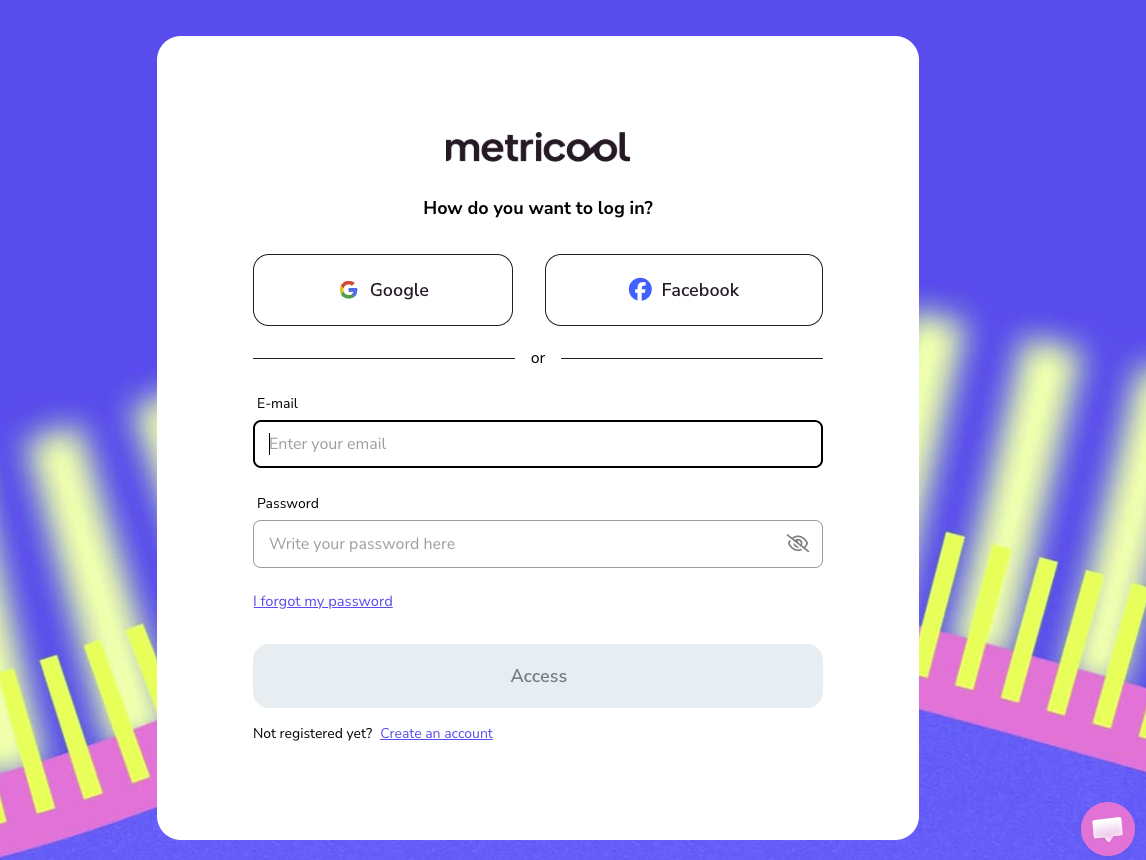
Go to the login page
Open your browser and go to https://app.metricool.com/login.
Choose your login method
You have three options to log in:
With Google
Click the "Google" button
Select the Google account you used to sign up
Grant access if prompted
With Facebook (only available on FREE plans)
Click the "Facebook" button
Log in to your Facebook account if you are not already logged in
Authorize access to Metricool
With email and password
Enter your email address in the E-mail field
Enter your password in the Password field (you can use the eye icon to see it while typing)
Click "Access"
Single sign-on (SSO) through a corporate identity provider, such as Okta or Microsoft Entra ID, is not currently available in Metricool. Use one of the methods above to log in.
Complete security verification (if enabled)
Depending on your account, you may be asked for one extra code after entering your credentials: the code from your authenticator app if you have two-factor authentication enabled, or an email verification code if Metricool doesn't recognize this device or location and you don't have 2FA enabled. You won't be asked for both. See Email verification code for new device or location for details on the email code.
Access the dashboard
Once successfully authenticated, you will be automatically redirected to your Metricool dashboard, where you can manage your brands and social profiles.
Check How to recover or change your Metricool password if you don't remember your password.
Common login issues
I can't log in with my credentials
Make sure you are using the correct email address you signed up with. If you're not sure, try recovering your password or check if you signed up using Google or Facebook instead of email.
It says my account doesn't exist
This usually happens if:
You used a different email address to sign up
You didn't complete the account activation process (check the confirmation email)
You signed up using Google or Facebook, not email and password
You were invited as a collaborator and haven't accepted the invitation yet
If you signed up with Google or Facebook, your Metricool account email is the one associated with that social network account. If you registered with an email and password and never clicked the activation link, see I haven't received the confirmation email.
I was invited as a collaborator and can't log in
When someone invites you to a brand, we create your account but keep it inactive until you accept the invitation from the email we sent you. Until then, the login screen on the website tells you the account isn't active and to check your email.
Open the invitation email and accept it. Don't sign up again, because your account already exists. If the invitation expired (invitations last 24 hours), ask the person who invited you to resend it from User management.
I didn't receive the confirmation email to activate my account
The activation email arrives right after you sign up with an email address and password. Check your spam or junk folder first; in Gmail, look in the Social or Promotions tabs instead of the main inbox.
If the email still hasn't arrived, contact support through the chat available in the tool or write to [email protected]. Support can resend the activation email so you can activate your account and log in.
My account is disabled
If you can't log in because your account is disabled, contact support through the chat available in the tool or write to [email protected]. Support can enable your account and resend the activation email. If you are not sure which email address you signed up with, support can help you identify it.
If you were invited as a collaborator, check first that you accepted the invitation from your email.
Once support confirms your account is enabled, log in again at https://app.metricool.com/login.
I changed my password but it still doesn't work
After changing your password:
Clear your browser cache and cookies
Completely close the browser
Open it again and try logging in
Check How to clear browser session data for Metricool for detailed instructions.
I don't receive the password recovery email
Check the following:
Spam or promotions folder
Make sure your email address is spelled correctly
Wait 10–20 minutes, sometimes there are delays
If the issue persists, contact support
Google or Facebook login doesn't work
If you experience errors with social login:
Make sure you are logged in to that social network in your browser
Try using incognito/private mode
If none of these cases matches your situation, contact support through the chat available in the tool or write to [email protected] so the team can review your account.
Security tips
Do not share your password with anyone. If you need to give access to your team, use Metricool's collaborator system
Use a strong password with uppercase letters, lowercase letters, numbers, and special characters
Enable two-factor authentication for extra account protection, especially if you have ads accounts connected
Log out if you use a shared computer. You can manage active sessions from your account
If you need to close open sessions for security reasons, check How to close active Metricool sessions
Don't have an account yet?
If you don't have an account yet, click here to go directly to the registration form.