
You can only delete a scheduled monitoring session if it has not yet started, meaning those with a "pending" status. Click on "delete data," and the session will be canceled, automatically restoring the balance.
Hashtag Tracker
What is it?
The hashtag tracker is a tool that allows you to monitor the use of a certain hashtag. It is not included in any plan as you only pay for the time of use. The cost is 25€ per day per social network. In addition, when you buy days of credit, you can get for every 4 days of purchase 1 more day free of charge.
You can find this feature under Reporting > Hashtag Tracker in the top menu.
Data update
The monitoring session data will be automatically updated every 8 hours, however, you can manually update the information up to 3 times per day.
Social media available for monitoring
The Hashtag Tracker feature is available for Twitter and Instagram.
There are 3 tracking options for Twitter:
A hashtag: with the pound symbol #
A keyword: with no # (it will also monitor the hashtag)
An account with @
You can monitor Twitter up to 7 days back
You can add more than one hashtag or keyword in a single tracking session, but the data will be for all hashtags or keywords together. If you prefer the data separately then you will need to create a separate session for each hashtag. This is only available for Twitter, it would not be possible for Instagram.
For Instagram it is only possible to set up the session with a single hashtag with the pound symbol (#) and it's possible only to monitor an Instagram hashtag from the day you set up the tracking session. It only tracks the hashtag if it is shared in a post in the feed and reels, not stories.
Requirements to use the Hashtag Tracker
To use the Hashtag Tracker, you need to meet the following requirements:
Have the social networks connected: You must have the specific social networks you want to monitor (X/Twitter and/or Instagram) connected to your Metricool account.
X (Twitter) connection requires the X addon: If you want to monitor hashtags on X, you need to have the X addon enabled in your account, as this allows the connection to X.
If the required social network is not connected, the tracking button for that network will appear disabled/grayed out, and you won't be able to create monitoring sessions for that platform until you connect it.
How to start monitoring
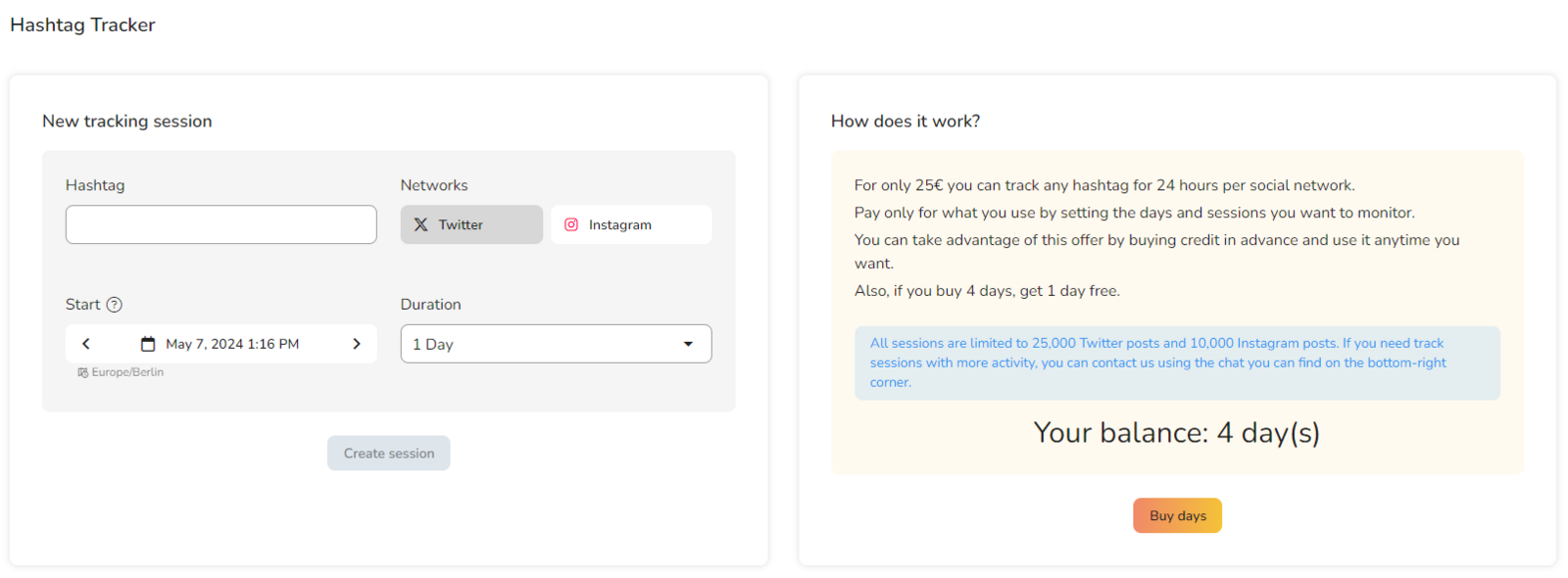
Purchase the days (for every 4 days of purchase, you'll get 1 additional day at no cost) and they will be added to your balance.
Add the hashtag you want to monitor.
Select the social media networks.
Set a start date.
Choose the duration in days (from the available balance).
Press to create a session.
Remember that each network consumes a full day of balance. To monitor simultaneously on Twitter and Instagram, it will be two days of balance for each day to monitor. Also, you can only cancel monitoring and get a refund if it hasn't started yet.
Demos
In the "Saved hashtags" section you can download various monitoring demos.
FAQs
Is it possible to delete a scheduled session?
Can I merge reports from different sessions?
It is not possible to merge reports. Each session automatically generates a separate report.
Can previous data be monitored?
For X (Twitter), it is possible to select up to 7 days prior to the session creation date. For Instagram, monitoring is only available from the session creation date onwards.
What does one day of balance include?
Each day of balance allows you to monitor one hashtag for one social network over 24 hours. In each monitoring session, you can measure up to 25,000 posts on X and 10,000 posts on Instagram.
If you need to monitor on both X and Instagram, you will need one day of balance for each network per day. (24 hours for both networks would require two days of balance).
Is the Hashtag Tracker included in any plan?
No, this functionality is not included in any plan and is available as pay-per-use.
Why is the tracking button disabled?
The tracking button will appear disabled/grayed out if the social network you want to monitor is not connected to your Metricool account. To enable it:
For Instagram: Connect your Instagram account in the Settings section.
For X (Twitter): You need both the X addon enabled in your account AND your X account connected to Metricool.
Once the connection is established, the button will become active and you'll be able to create monitoring sessions.
You can find more information about our hashtag tracker and the social walls in these tutorials.
Was this helpful?