
To add songs from the Top 100 trends, you need a Business account connected to Metricool. Personal accounts only allow random music, and only for photos and carousels.
How to add music to your TikTok posts from Metricool
Updated 7 days ago
From Metricool, you can add music to your TikTok posts directly while scheduling them. The available options depend on the type of account you have connected:
Business account: You can choose a song from TikTok’s Top 100 trending songs for videos, photos, and carousels, with filters by country and genre. For photos and carousels, you can also add random music instead.
Personal account: You can add random music only to photos and carousels.
Not sure which one you have? Check your account type in TikTok.
Add a trending song
Business accounts connected to Metricool have access to TikTok’s Top 100 trending songs. You can pick the exact song for videos, photos, and carousels directly from the calendar.

In Planning, create a new TikTok post
Upload your video, photo, or carousel
Add your post text (optional)
Under "TikTok presets", click "Add music"
Select the song. You can use the search bar and filter songs by country and genre
For videos: Choose the exact song snippet by dragging the time selector
Click Save
Choose the date and time, then finish by clicking Schedule or selecting any other option from the dropdown
The song you picked appears next to "Music of post" in the TikTok presets. Until the post is published, click "Edit music" to choose a different song, or click the trash icon to remove it.
Keep the Auto-publish button enabled. Music can only be added when the post publishes automatically.
You can’t add a song while "Add random music" is enabled. If "Add music" is unavailable, turn off the random music toggle first.
Need a song that isn’t in the Top 100? Use manual publishing to finish your post in the TikTok app, where you can access the entire Commercial Music Library. See How to manually publish via notification.
Add random music
Business and Personal accounts can add random music to photos and carousels, and TikTok selects a song automatically.
In Planning, create a new TikTok post with a photo or carousel
Upload your images
Add your post text (optional)
Under "TikTok presets", enable "Add random music"
Add a title for your photo (optional)
Choose the date and time, then finish by clicking Schedule or selecting any other option from the dropdown
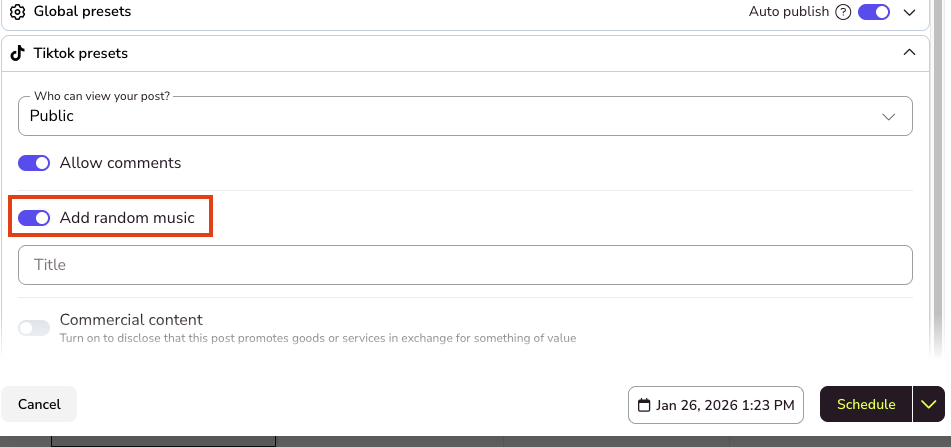
On a Business account, random music and a selected song can’t be combined in the same post. To enable "Add random music", remove the selected song first. To choose a song instead, turn the toggle off.
Check your account type
Your account type on TikTok determines which music options you get in Metricool. To find out whether you have a Personal or Business account:
Open the TikTok app
Go to your profile (bottom-right icon)
Tap the menu (☰) in the top-right corner
Select "Settings and privacy"
Tap "Account"
Look for "Switch to Business Account" or "Account type"
If you see the option "Switch to Business Account", you have a Personal account. If you see "Business Account", you already have a Business account enabled.
Before changing your account type, keep in mind that a Business account gives you more music options in Metricool, but it also comes with some limitations on TikTok, such as restricted use of certain songs and features. For example, TikTok may mute the music in previous posts if they used songs that aren’t available for commercial use.
FAQs
Why can’t I add trending music to my post?
Can I choose a specific song for a photo or carousel?
Yes, with a Business account. You can pick a song from the Top 100 trends for photos and carousels, the same way you do for videos. If you prefer, you can add random music instead.
Can I choose a specific song if I have a Personal account?
No. With a Personal account, TikTok selects the music automatically and you can’t choose a specific song or a specific snippet.
Can I add music to videos with a Personal account?
No. With Personal accounts, adding music is only available for photos and carousels, not for videos.
Can I add random music with a Business account?
Yes, for photos and carousels. Enable "Add random music" in the TikTok presets instead of selecting a song. You can’t use both in the same post.
What if I want to use a song that isn’t in the Top 100?
Use manual publishing. Metricool sends you a notification and you complete your post in the TikTok app, with access to the full Commercial Music Library.
Can I change or remove the music after scheduling the post?
Yes. As long as the post hasn’t been published, you can click "Edit music" to change the song or use the trash icon to remove it from the planner.
Do I need Auto-publish enabled?
Yes. To publish automatically to TikTok and add music from Metricool, the Auto-publish option must be enabled in the planner.
Is it recommended to switch my Personal account to Business to use this feature?
Not necessarily. Business accounts have access to more music options from Metricool, but they also include restrictions on TikTok, such as limited use of non-commercial songs. In addition, TikTok may mute the music in previous posts if they used songs that aren’t available for commercial use. Before changing your account type, we recommend reviewing TikTok’s official information about Business accounts.
Was this helpful?
Was this helpful?