
Manage or Unsubscribe from Commercial Communications
Updated 3 months ago
Manage the commercial communications you receive from Metricool from the preferences page that opens when you click Unsubscribe in the footer of any commercial email. There you can turn each communication category on or off, update your name and email language, or unsubscribe from all commercial emails in one step.
Why you receive commercial communications
You receive commercial communications because the "I do not wish to receive communications about news, offers and/or promotions from Metricool" checkbox on the registration form was left unchecked when you created your account. The option appears below the Legal Terms checkbox on the sign-up page.
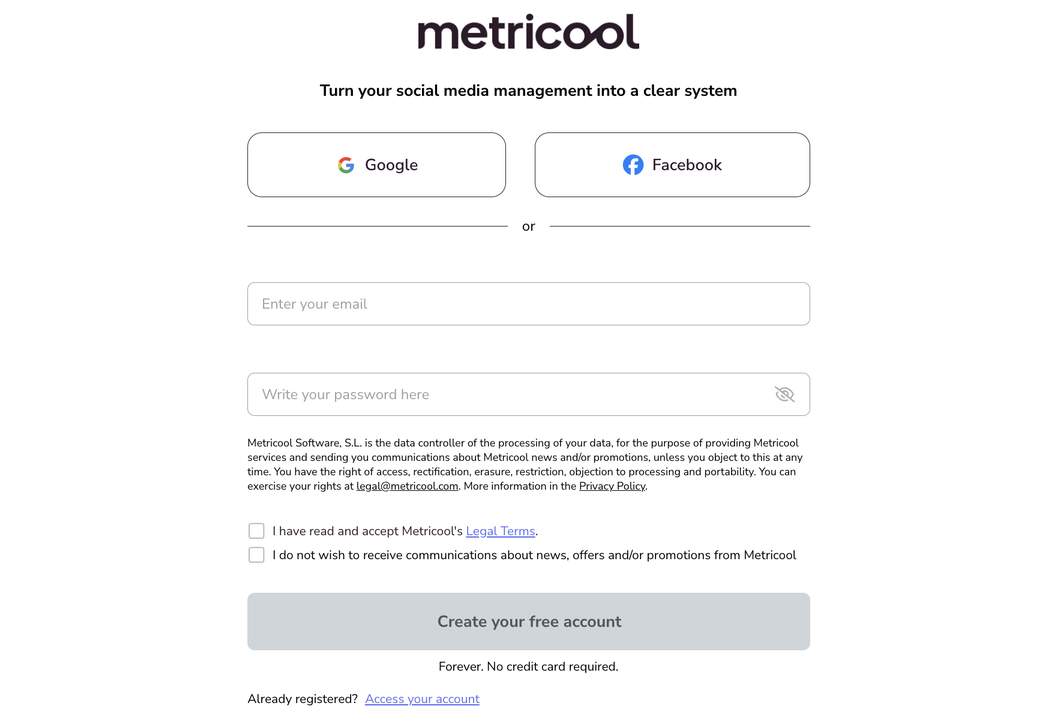
You can change this at any time from any commercial email itself — no change in your account settings is needed.
The same applies when you create your account from a shared-brand invitation: joining a brand through User Management uses the standard registration form, and there is no separate collaborator-only account.
Manage your commercial email preferences
Use the footer of any commercial email from Metricool to open your email preferences. From there you can manage your categories or unsubscribe completely:
Open a commercial email from Metricool.
Scroll to the footer and click Unsubscribe. Your email preferences page opens.
Select the categories you want to keep receiving. You can also update your name, surname and the language you receive emails in.
Click Save preferences.
Each email you receive belongs to one of the categories you have active. Unchecking a category stops that type of email; the emails that keep arriving match the categories you leave checked.
Email categories you can manage
These are the five communication categories on the preferences page:
Category | What it includes |
|---|---|
Product tips and tutorials | Emails with videos, tutorials and step-by-step instructions to get the most out of Metricool. |
New features and special announcements | Emails with announcements of new features, news and launches from Metricool. |
Offers and event invitations | Emails with special offers and/or invitations to events. |
Inbound Marketing Automations | Emails with tips and suggestions after downloading free content from Metricool. |
Newsletter | Social media news and updates. |
Unsubscribe from all commercial emails
To stop every commercial email, use the "unsubscribe from all emails" option at the bottom of the preferences page: select a reason and confirm. You will still receive transactional emails, such as password resets, billing alerts and any Metricool reports you have configured to be sent automatically to your email.
What your preferences affect
Your commercial email preferences only control news, offers and promotional communications. They do not affect transactional emails such as password resets, billing alerts or automatically sent Metricool reports, nor the platform-usage emails managed from your notification settings.
Separately, the optional monthly summary email is configured from Account Settings > Account > Monthly summary, not from these commercial email preferences.
Related articles