
How to download or receive my invoices by email?
Updated 3 months ago
From your Metricool paid account, you can download your invoices from the payment history or set up automatic email delivery to any recipient.
Here’s how both options work.
Download invoices from the payment history
To download your invoices directly from your account, follow these steps:
Go to Plan and billing
Scroll down to Payment history
Find the invoice for the billing period
Click the document icon to download it

Invoices are generated automatically after each payment is completed.
If your account has reverted to the Free plan, you can still access and download invoices generated during your paid subscription from the same payment history section.
Set up automatic email delivery
When you set up email delivery, each time a new invoice is generated, Metricool will automatically send an email to the configured addresses.
The email includes:
A Download button to get the invoice directly, without accessing Metricool.
A link to your account settings, available only to the account owner, where they can check the payment history.
Remember that in accounts with shared brands, only the account owner can make this configuration and access the payment history.
Invited users or collaborators do not have access to invoices from the account, although they can receive them by email if they are added as recipients.
To add an email address, follow these steps:
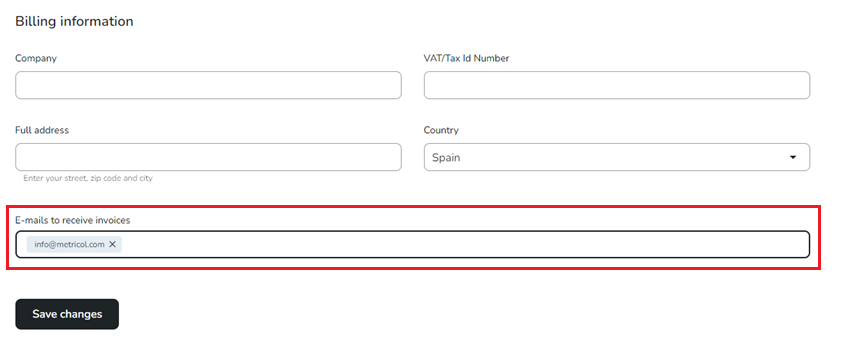
Enter the recipient’s email address in the field.
Press Enter (repeat for each recipient).
Click Save changes to finish.
To remove a recipient, click the ✕ icon next to their address and click Save changes again.
How the invoice link works
The Download button doesn’t attach a PDF to the email — clicking it generates the invoice on the spot, and it will always show the same content. The link doesn’t expire; it keeps working for as long as the payment stays in the account’s history, and it doesn’t require logging in to open it.
Important: Because the link doesn’t ask for a login, anyone who receives that email can view the invoice. We recommend not forwarding that email, and only adding people who should have access to your invoices as billing recipients.
It’s important to keep your billing details and payment method (Card or PayPal) up to date.