
I can't connect X (Twitter)
Updated 3 months ago
If you can't connect an X (Twitter) account, the problem usually comes down to one of two causes: the token error "The Request Token for This Page Is Invalid" or a linked or secondary account that connects the main profile instead.
Connection failure : "The Request Token for This Page Is Invalid"
This error might pop up when trying to connect X accounts to Metricool due to issues with the API authentication token. These tokens are essential for secure connections and for verifying that the request comes from you. However, they can become invalid under certain circumstances.

Common Causes of Token Errors:
Token expiry: tokens can expire quickly, especially if the connection process takes too long.
Interrupted connection process: if the connection is stopped or interrupted midway, the token becomes invalid.
Token reuse: attempting to reuse the same token can also result in errors.
How to Resolve the Issue:
Open a new tab in incognito mode, or try another browser.
Log in to Metricool and go to the connections dashboard.
Click the Connect Account button for X. A pop-up window appears for authentication.
Enter your X account credentials and follow the steps to complete the connection process.
Due to changes in the X (Twitter) API, you need to accept both authorizations to complete the connection flow if required.
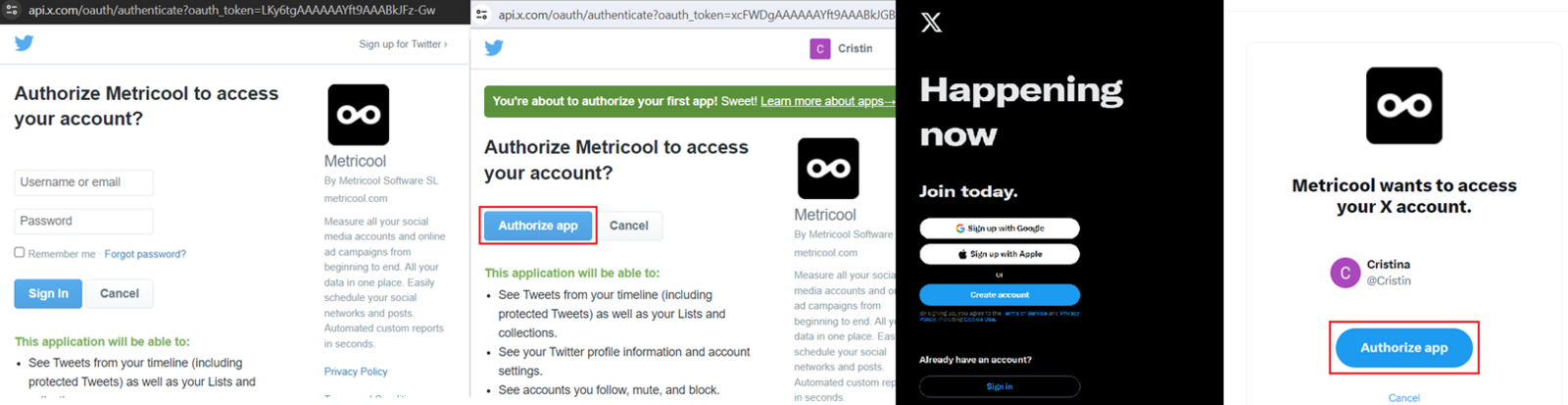
Clear your browser's cache and cookies to remove old session data that could conflict with the connection process.
Problems Connecting "Linked" X Accounts
X does not allow connecting "secondary" or "linked" accounts through its API.
If, when trying to connect an account:
You enter credentials for a different account
But another account connects instead (usually the main one)
Even when using incognito mode or clearing cookies
This means the account you're trying to connect cannot authenticate independently.
What's Happening
Metricool uses X's official authentication system:
Each connection corresponds to a single account
The account must be able to authenticate independently
If the account depends on another account (due to internal management or shared access), X will always return the main account during the connection process.
How to Connect It Correctly
The solution is always the same: the account must authorize the connection directly.
You have two options:
Option 1: Use the Account's Original Credentials
Log in to X with the account you want to connect.
Perform the connection in Metricool.
If the authentication is correct, Metricool will detect that specific account.
Option 2: Have the Real Owner Perform the Connection
If you don't have direct access, the owner can connect the account for you. You have two alternatives within Metricool (available on Advanced or Custom plans):
Share a connection link (no Metricool account needed): Share a connection link with your clients
Give them permissions in the brand so they can perform the connection directly
It is not possible to connect dependent accounts or accounts managed as sub-accounts. Metricool cannot modify which account X returns during the connection process; this behavior depends on X's API.