
This feature requires your Instagram account to be connected via Facebook Login. If you're connected via Instagram Login only, you'll see an informative tooltip in the audio selector.
How to add audio to your Instagram Reels from Metricool
Updated 5 months ago
Scheduling Reels with audio is available as of May 18, 2026.
You can schedule Instagram Reels with audio directly from Metricool—no need to open Instagram after posting to add music manually. This feature works for both regular Reels and Trial Reels. Add music from Meta's library or original sounds uploaded by other creators while scheduling, and everything publishes together.
Facebook Login required: This feature only works if your Instagram account is connectedvia Facebook. If you're connected via Instagram Login only, you'll see an informative tooltip in the audio selector.
How to add audio to your Reel
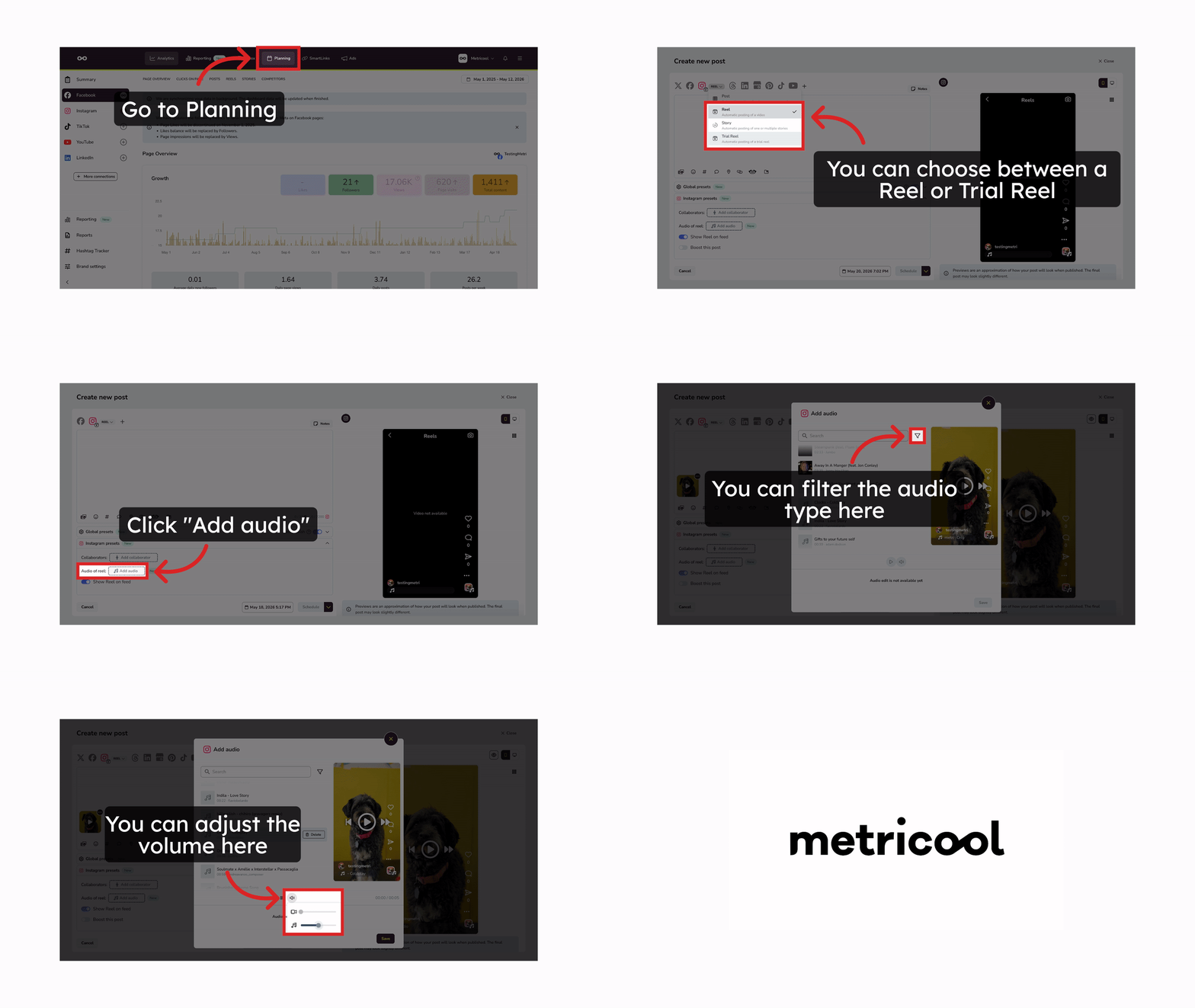
When scheduling a Reel from Metricool, you can browse and add audio before publishing:
In Planning, create a new Instagram Reel
Upload your video
Add your caption and configure any other settings (hashtags, location, etc.)
In the "Instagram presets" section, click "Add audio"
Search for a song or browse the available tracks
Use the search bar to find specific audio
Use the Audio type filter to narrow results: All, Music, or Original audio
Each track shows the title, artist, duration, and thumbnail
Click the play button to preview before selecting
Click Save to apply the configuration
Choose the date and time, then click Schedule
Your Reel will publish with the selected audio.
Enable Auto-publish so your Reel publishes automatically with the audio.
What audio is available
The audio library in Metricool includes:
Music tracks: Licensed songs from Meta's library authorized for third-party publishing
Original sounds: Sounds uploaded by other creators
You can preview any track before adding it to your Reel—just click the play button to listen.
Audio selection may be limited: Metricool only shows audio that Instagram authorizes for third-party use. Some trending songs in the Instagram app may not appear in this library.
Best practices for choosing audio
Start with trending sounds to maximize potential reach and user familiarity.
Check the audio details to verify duration and artist before confirming.
Current limitations
Web only: This feature is available on the web version. Mobile app support is planned for a future update.
Reels only: Not available for feed posts or Stories.
No audio trimming: Currently, audio starts from second 0.
Frequently asked questions
Why can't I see the "Add audio" option?
Can I trim or offset where the audio starts?
No. Currently, the audio always starts from the beginning (second 0).
Can I preview how the video sounds with the audio mixed in?
No. The preview lets you listen to the selected audio and see a mobile-style preview of your post, but the API doesn't provide a unified preview of the video with the final mix.
What if the song I want isn't available?
If the audio you're looking for isn't in Metricool's library, you have two options:
Choose a different track from the available selection
Publish manually via notification and add the audio directly in Instagram
For manual publishing, see How to manually publish via notification.
Can I edit the audio after scheduling?
Yes. As long as the Reel hasn't been published yet, you can edit or remove the audio from the planner.
Does this work for other Instagram post types?
No. Currently, this feature is only available for Reels. Feed posts and Stories don't support audio scheduling from Metricool.
Can I filter audio by country or music genre?
No, filtering by country or music genre is currently not available. However, you can use the Audio type filter to narrow results:
All: Shows all available audio
Music: Licensed songs from Meta's library
Original audio: Sounds uploaded by other creators
Related Articles
Was this helpful?
Was this helpful?