
Schedule and Post on Instagram
Updated 3 months ago
With Metricool, you can schedule and auto-publish Instagram posts, Reels, Trial Reels, and Stories as long as your account is a business or creator profile. Content that needs features the Instagram API doesn't support, such as links or interactive stickers in Stories, is published manually via notification.
Quick Summary
Format | Auto-Publishing | Exceptions (Require Manual Publishing) |
|---|---|---|
Post | ✅ | Carousels with videos over 60s |
Reel / Trial Reel | ✅ | Audio not available in library, interactive stickers |
Story | ✅ | Links, interactive stickers |
Instagram features that cannot be auto-published: Stories with links, mentions, or stickers; Reels with audio not available in Metricool's library or with interactive stickers; and carousels with videos over 60 seconds. These are published manually via notification.
Good to know
Posting limit: Instagram's API allows a maximum of 50 posts (feed posts, Reels, and stories) every 24 hours.
Connection restrictions: Some features are not available when you connect your account directly with Instagram credentials. Check Access to Instagram from Metricool: connection types and differences to see the options available for each connection type.
Video format: Instagram only allows individual videos to be published as Reels via its API, so all videos scheduled from Metricool are sent as Reels rather than feed posts. You can still include videos in carousels, as long as their aspect ratio is between 4:5 and 16:9.
Formats & Available Options
Metricool allows you to schedule and auto-publish the main Instagram formats, with some exceptions based on API restrictions.
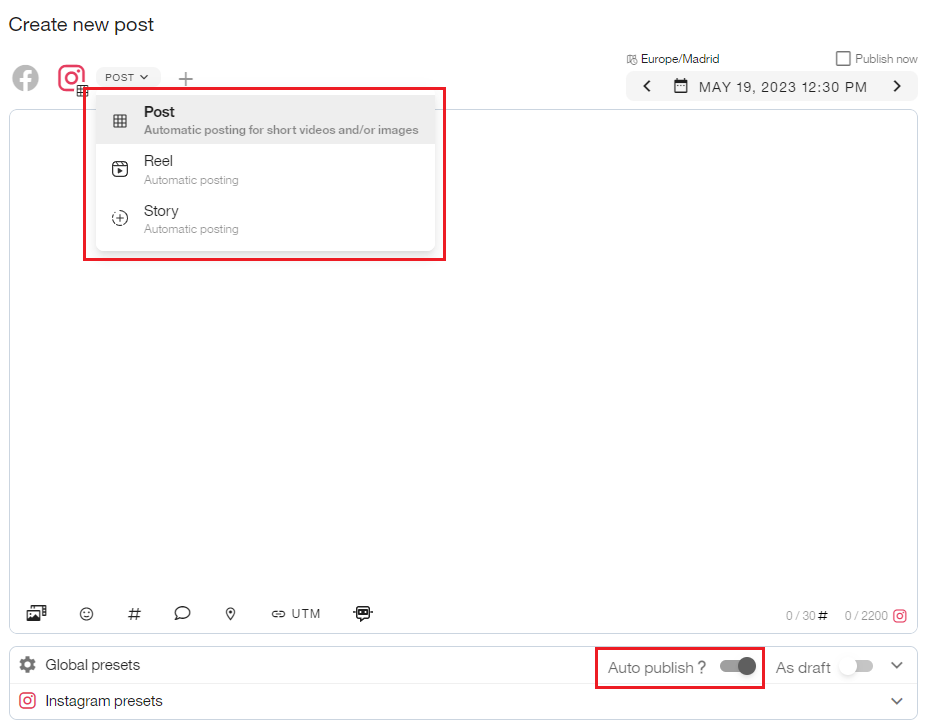
Posts: Appear in the feed and can include an image, video, or carousel (up to 10 images or videos).
Reels: Vertical videos, up to 15 minutes, with the option to also appear in the feed.
Trial Reels: Let you test how a Reel performs before publishing it permanently to your feed. See How to Publish Instagram Trial Reels in Metricool for more details.
Stories: Vertical ephemeral content that disappears after 24 hours.
To save the stories published from Metricool, you must have the story archive enabled in your Instagram account settings. You can activate this feature from the Instagram app: Profile > Menu ☰ > Archive > Settings > Save story to archive.
Option | Posts | Reels | Stories |
|---|---|---|---|
Add a location | ✅ | ✅ | ❌ |
Promote post | ✅ | ✅ | ❌ |
Hashtag search (paid plans only) | ✅ | ✅ | ❌ |
Tag people (Not available in video carousels) | ✅ | ✅ | ❌ |
Tag products | ✅ | ✅ | ❌ |
Add Alt Text | ✅ | ❌ | ❌ |
Mention accounts with @ | ✅ | ✅ | ❌ |
Add a video thumbnail | ✅ | ✅ | ❌ |
Add first comment | ✅ | ❌ | ❌ |
Add collaborators (Up to 5) | ✅ | ✅ | ❌ |
Add audio | ❌ | ✅ | ❌ |
Tag audio | ❌ | ✅ | ❌ |
Notes
Character limit: 2,200 per post.
Hashtag limit: 30 per post.
Although up to 30 hashtags can be included per post through the API, Instagram recommends prioritizing relevant hashtags and avoiding excessive use (for example, between 3 and 5).
Auto-publishing
You can schedule and auto-post to your Instagram account as long as it is a professional business or creator account. Stories that include links, stickers, and similar elements are not supported in automatic posting.
Images and videos (up to 15 minutes) must also meet certain requirements to be published automatically. Check the specifications in Publishing Requirements for Images and Videos from Metricool. Exceptionally, videos included in carousels should not exceed a duration of 60 seconds.
To publish automatically, enable the auto-publish button and select Feed Post, Reels, or Stories when you create the post. Posts that don't meet the auto-publishing requirements are published manually via notification instead.
Instagram Presets
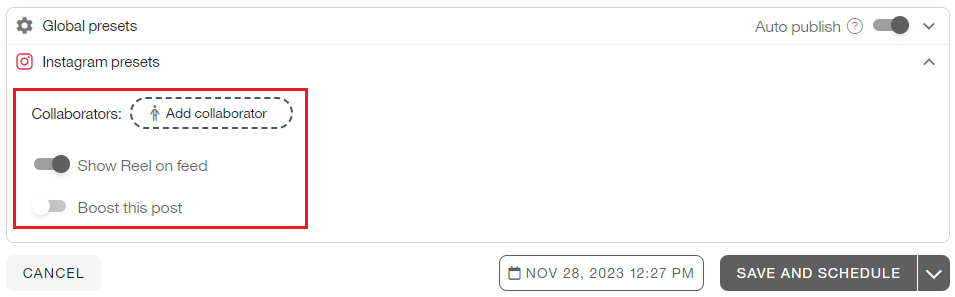
These presets are available when you schedule Instagram content:
Show Reel on Feed: Activate this option to display your Reels in the feed.
Add Collaborator: Add up to 5 collaborators. The collaborator must approve the request in the Instagram app. Once approved, both accounts appear as authors of the post. Stories are excluded. If the collaborator does not approve the request, the post is published without the collaboration. Due to an Instagram API limitation, private or age-restricted accounts are not eligible as collaborators. Check the steps to verify if your account has age restrictions set in Instagram's help center.
To learn more, check out our blog post "How to Create Collaborative Posts on Instagram". Collaborative posts only appear when your account is the creator of the content. To view information about a post where you are a collaborator, add the content creator's account as a competitor.
Boost this post: Increase the reach of your posts by promoting them. More details in the How to Boost your Posts article.
AI-generated content: Turn on this option to flag a scheduled image, Reel, or carousel as AI-generated content. Metricool passes the label to Instagram at publishing time. The option works with both Instagram connection types (via Facebook and via Instagram login).
Multimedia Options
Click on the three dots in the attachment to see all the options:
Edit Video/Image: Edit your multimedia content; expand details in Edit images and videos while scheduling your content.
Tag People: Tagged accounts must be public on Instagram. Refer to Mention and tag other accounts for more information (not supported for video carousels or stories).
Tag Products: Tag products on Instagram; see the step-by-step in the Tag Instagram Products article.
Upload video thumbnail: Import a cover for your video.
Select Cover: Choose a frame from the video as the cover.
Add audio: Add audio to your Reels directly from Metricool's library. You can select from available audio options or upload your own audio file.
Tag audio: Edit the displayed name for your Reel's audio. By default, it shows as "Original audio". If you add audio using the "Add audio" option, this audio tag won't be applied.
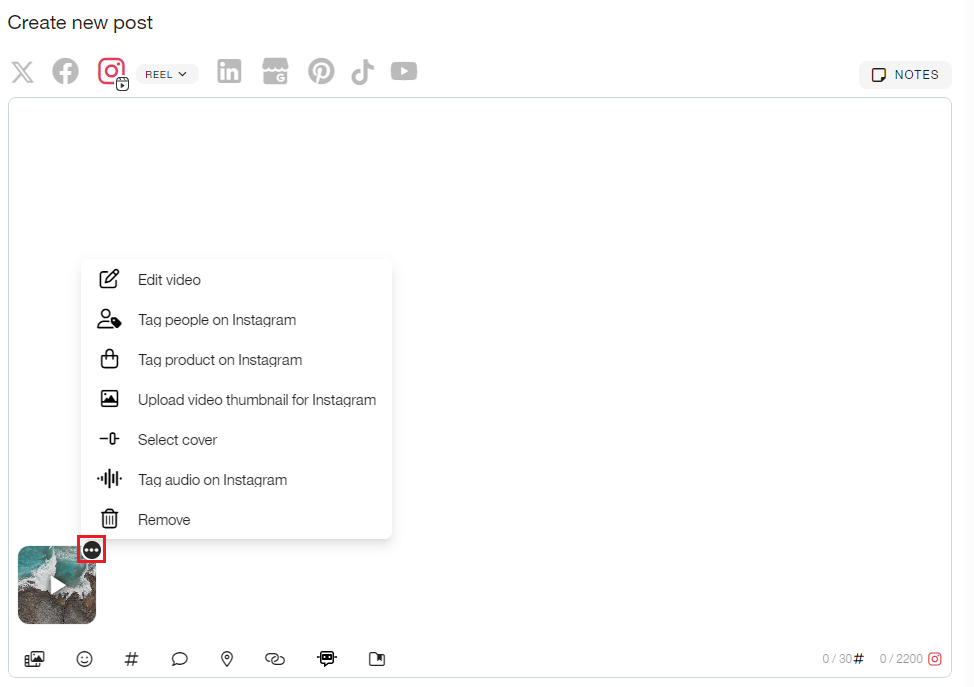
If the audio you want is not available in Metricool's library or you need to add interactive stickers, disable the Autopublish option and publish manually via notification. This way, you'll receive a notification that downloads the media and opens Instagram so you can add these elements natively. About the cover, you can choose it within the video, or upload a file (the recommended image size is 1080px x 1800px). The option is available on the three dots icon on the thumbnail of the attached video.
Manual Publishing
Publication is manual and works via notifications in these cases:
Stories that include links, mentions, or stickers
Reels with audio not available in Metricool's library or with interactive stickers
Any post that does not meet the requirements for auto-publishing
When creating the content, select the type of post in the dropdown menu and ensure the auto-publish button is toggled off.
Manual posting works through notifications that you can set up to receive in your email or mobile device (recommended option). When it's time to post, click on the notification and the image/s will be downloaded to your gallery, the text will be automatically copied to the clipboard, and you'll be redirected to the Instagram app.
See How to set up notifications for manual publishing for the full setup steps.
See How to manually publish via notification for the full step-by-step.
Feed Preview
This feature helps you visualize the design of your Instagram Feed with the scheduled posts in the calendar.
From Planning, click on the three dots and, in the dropdown menu, select "Preview feed". Then, choose the view: iOS (vertical) or Android/Web (square).

Content information: The information button is displayed on scheduled content, allowing you to easily distinguish scheduled content from already published content (which does not include the button). Click on the information button of the post to see the scheduled date and the status of the content (pending or draft). To hide/show the icon, click on the information icon on the right. The opacity filter visually indicates that the content is in draft.
Edit the content: To edit the post, click on the pencil button.
Additionally, you can zoom in or out on the preview with the magnifying glass icons on the right.
Image & Video Requirements
These are the requirements that images, Reels, and Stories must meet to be published from Metricool.
Images
Format: JPEG or PNG
Size: up to 8 MB
Aspect ratio: between 3:4 and 1.91:1
Minimum width: 320 pixels (scaled to minimum if necessary)
Maximum width: 1440 pixels (scaled down to the maximum if necessary)
Height: Varies, depending on width and aspect ratio
Maximum columns (horizontal pixels): 1920
Instagram does not support ProPhoto RGB, the standard color profile in Photoshop and Lightroom. If used, it may affect the color in the published images.
Reels
Size: up to 500 MB
Duration: from 3 seconds up to 15 minutes
Container: MOV or MP4 (MPEG-4 Part 14), no edit lists, moov atom at the front of the file
Audio codec: AAC, 48kHz sample rate maximum, 1 or 2 channels (mono or stereo)
Video codec: H264, progressive scan, closed GOP, 4:2:0 chroma subsampling
Audio bit rate: 128kbps
Video bit rate: VBR, 25Mbps max
Frame rate: 23-60 FPS
Maximum columns (horizontal pixels): 1920
Aspect ratio: 9:16 to avoid cropping or blank spaces
Instagram only allows individual videos to be published as Reels via its API. From Metricool, all videos will be sent as Reels (not as feed posts). You can still include videos in carousels, as long as their aspect ratio is between 4:5 and 16:9.
Stories
Story Image Specifications:
Format: JPEG
File size: 8 MB maximum
Aspect ratio: We recommend 9:16 to avoid cropping or blank space
Color Space: sRGB. Images using other color spaces will have their color spaces converted to sRGB
Story Video Specifications:
Container: MOV or MP4 (MPEG-4 Part 14), no edit lists, moov atom at the front of the file
Audio codec: AAC, 48kHz sample rate maximum, 1 or 2 channels (mono or stereo)
Video codec: H264, progressive scan, closed GOP, 4:2:0 chroma subsampling
Frame rate: 23-60 FPS
Maximum columns (horizontal pixels): 1920
Aspect ratio: Required between 0.1:1 and 10:1, but we recommend 9:16 to avoid cropping or blank space
Video bitrate: VBR, 25Mbps maximum
Audio bitrate: 128kbps
Duration: 60 seconds maximum, 3 seconds minimum
File size: 100MB maximum