
Instagram doesn’t publish the exact limit, and it can change over time. The limit is set by Instagram, and Metricool can’t raise it. To stay under it, publish a few Trial Reels per day and spread them out instead of scheduling several in a row.
How to Publish Instagram Trial Reels in Metricool
Updated last week
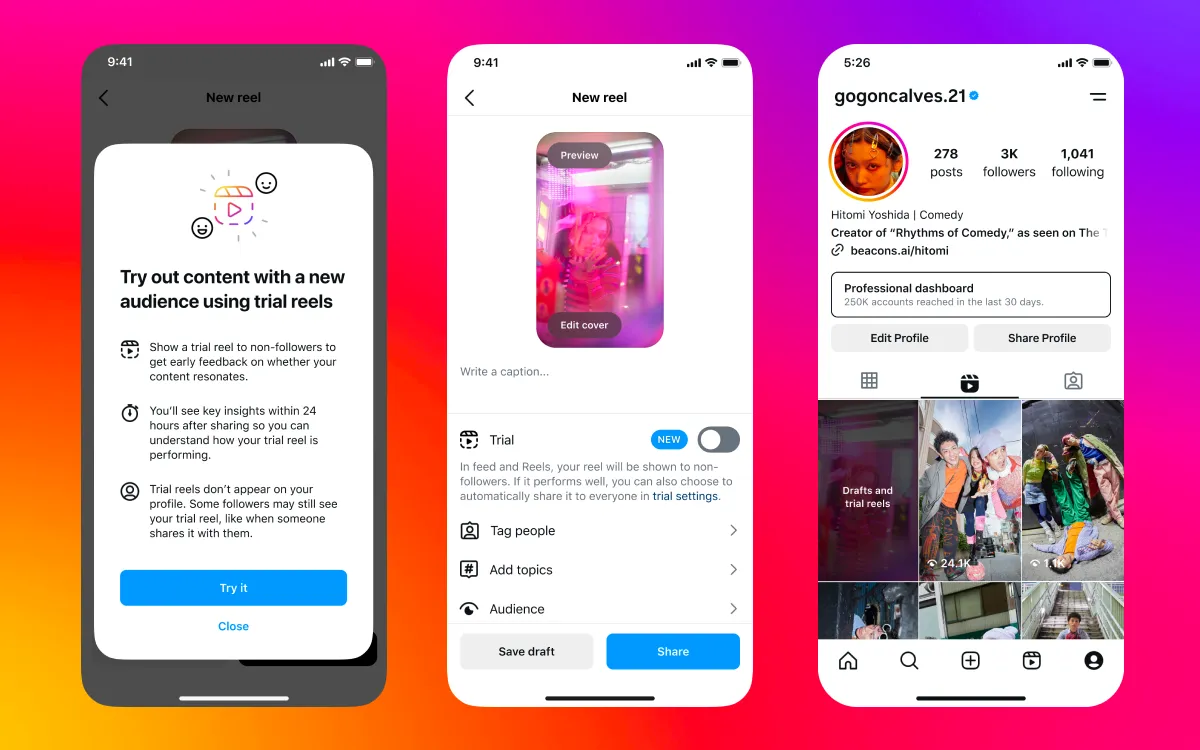
Trial Reels are a new Instagram format that lets you test how a Reel performs before publishing it permanently on your feed. Trial Reels are shown exclusively to people who don’t follow your account (non-followers), so you can analyze initial performance without impacting your existing audience.
Not all Instagram accounts have access to this feature: Instagram sets the requirements and checks them when the Trial Reel is published.
Good to know
Your account must meet Instagram’s requirements for Trial Reels (see below). Metricool can’t check them beforehand.
In Metricool, the option will always appear, but if your account doesn’t meet the requirements, publishing will fail.
Instagram also limits how many Trial Reels an account can publish. The limit is stricter than the one for regular Reels, and Instagram doesn’t disclose the exact number.
Collaborators (Collabs) can’t be added to this type of content.
Trial Reels are shown only to non-followers during the testing period.
Requirements to use Trial Reels
Instagram only enables Trial Reels on accounts that meet all of these requirements, which it lists in About trial reels on Instagram:
The account is public.
The account has at least 200 followers. This is Instagram’s minimum for professional (business or creator) accounts, the account type Metricool publishes to.
The account is eligible to appear in recommendations. If it isn’t, Instagram removes access to Trial Reels until the account is eligible again.
To check whether your account has any reach limits, open Account Status in your Instagram settings. Instagram explains how in its Account Status guide.
If your account doesn’t meet a requirement, Instagram rejects the Trial Reel when Metricool publishes it. The FAQs below explain the errors you may see.
Sharing the Trial Reel with your audience
Instagram lets you decide what happens to your Trial Reel after its initial publication.
If you enable Share automatically with everyone, Instagram will evaluate the Trial Reel’s performance during the first 72 hours.
If it gets a high number of views during that period, it will automatically be shared with your full audience.
If you don’t enable this option, the Trial Reel won’t be shared automatically, even if it performs well. You’ll need to manage it directly from Instagram.
This feature depends entirely on Instagram. Metricool always attempts the Trial Reel, and Instagram decides at that moment whether your account has access, based on its requirements.
How to publish a Trial Reel from Metricool (step by step)
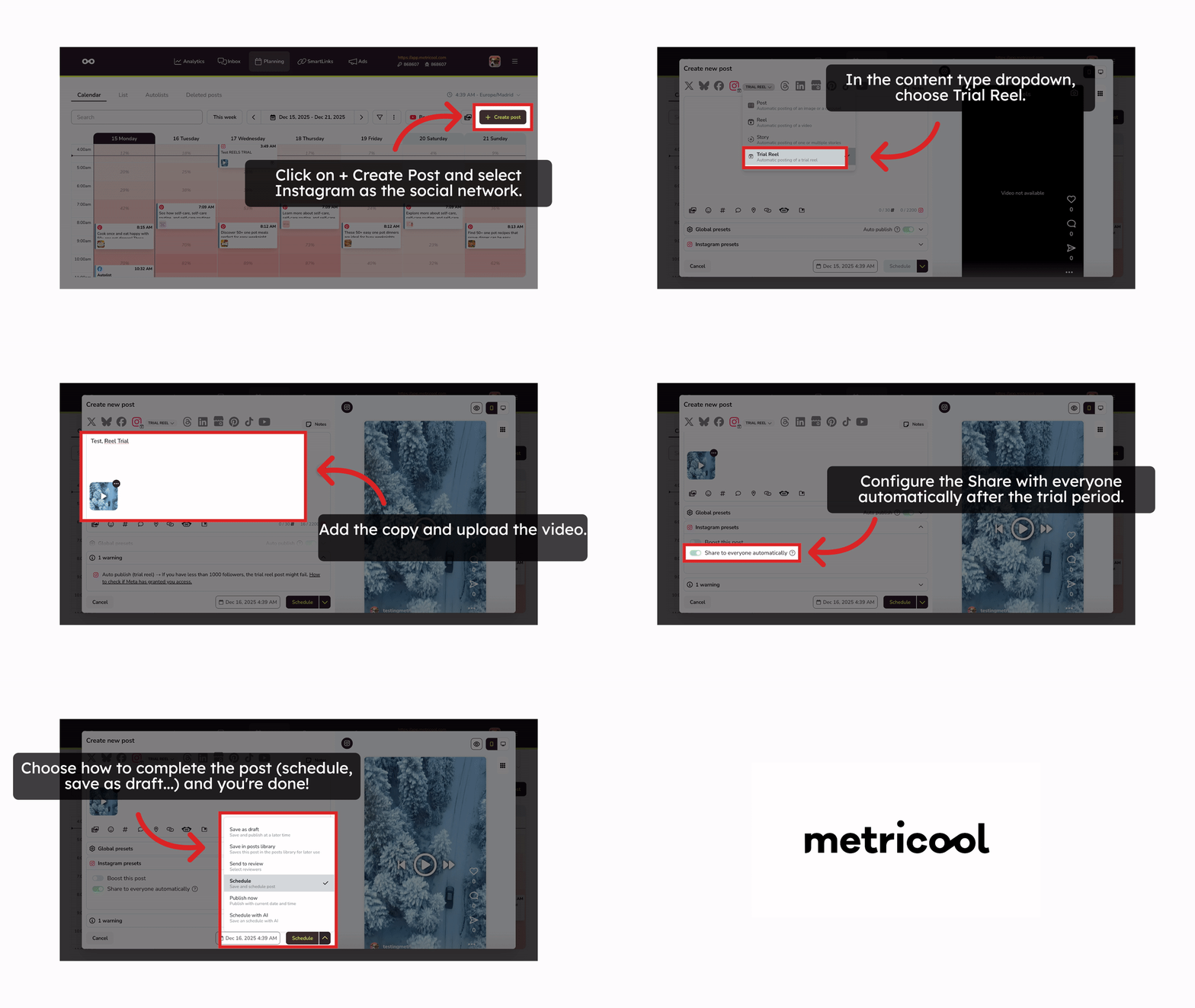
Click + Create new post and select Instagram as the social network.
In the content type dropdown, choose Trial Reel.
Add your caption and upload the video.
Configure the Share automatically with everyone option after the trial period.
Select the date and time (skip this step if you want to publish right away).
Choose how to complete the post (schedule, save as draft, etc.) — and you’re done!
How can I check if my account can publish Trial Reels?
Start by checking that your account meets the requirements above. The only reliable check is trying to publish: Metricool always attempts the Trial Reel, and Instagram decides at that moment whether your account has access. You can try from Metricool, or from the Instagram app directly if you prefer: if the Trial Reel option shows as enabled there, Instagram has activated the feature for your account.
The Trial Reels option always appears in Metricool during content creation, but it only works if your account meets Instagram’s requirements.
FAQs
How many Trial Reels can I publish per day?
Why do I see the Trial Reels option in Metricool if Instagram won’t let me publish them?
Because the option always appears in Metricool, but it will only work if your account meets Instagram’s requirements. If it doesn’t, publishing will fail.
Who sees a Trial Reel during the testing period?
Users who don’t follow your account (non-followers). Instagram analyzes early performance without showing it to your regular audience.
Do users know they’re watching a Trial Reel?
No. They’ll see it as a regular Reel and won’t know it’s in a testing phase.
Where can I see my Trial Reels on Instagram?
They’re visible only to you on your profile, in the drafts section. They don’t appear publicly on your feed while they’re in testing.
Can a Trial Reel appear elsewhere on Instagram even if it’s not on my profile?
Yes. Instagram states it may appear in other places, such as:
audio, filter, or location pages used in the Reel,
or if someone shares it via DM.
Can I add collaborators (Collabs) to a Trial Reel?
No. Instagram doesn’t allow collaborators for this format.
What happens after the 72-hour testing period?
If you selected the automatic option and performance meets Instagram’s internal criteria, the Reel will be published automatically on your feed.
If you chose the manual option, you’ll be able to decide whether to publish it or not.
Can I switch from manual to automatic after scheduling the Trial Reel?
No. Instagram doesn’t allow you to change the publishing mode once the Trial Reel has been created.
Why does the error The instagram account does not meet the trial reel follower requirement to create trial reels appear?
The instagram account does not meet the trial reel follower requirement to create trial reels appear?This error means your Instagram account doesn’t meet the follower requirement for Trial Reels, so Instagram rejects the Trial Reel. It’s the error you get when your account doesn’t have access to Trial Reels. If your Instagram account is connected through Facebook, the message starts with Trial Reel Not Enough Followers:.
Instagram requires at least 200 followers for professional (business or creator) accounts. Once your account reaches the minimum, schedule the Trial Reel again. In the meantime, you can publish the video as a regular Reel.
Why does the error You reached maximum number of trial reels that is allowed to be published by Content Publishing API appear?
You reached maximum number of trial reels that is allowed to be published by Content Publishing API appear?This error means you’ve reached the maximum number of Trial Reels that Instagram allows you to publish within a certain period of time. It’s a different error from the follower requirement: your account has access to Trial Reels, but it has used up its allowance.
Instagram applies a stricter limit to Trial Reels than to regular Reels, doesn’t publish the exact number, and adjusts it over time. An account that used to publish many Trial Reels in a day can have a lower allowance now.
Once you go over the limit, Instagram can block Trial Reels for more than 24 hours and doesn’t say how long the block lasts. Regular Reels keep publishing normally during that time.
While the block lasts, you can:
Space out your Trial Reels and publish only a few per day.
Publish the video as a regular Reel.
Create the Trial Reel directly in the Instagram app. Instagram may apply a different allowance there than to posts published through Metricool.
Wait until Instagram lifts the block.
Additional resources
Was this helpful?
Was this helpful?