
Yes. The color is optional, and several tags can share the same color.
How to create and manage tags
Updated today
You can create a tag in several places, and the main one is the tag selector while you create content in the planner. The Tags tab in Brand settings is where you manage them: create tags with a name and an optional color, rename or recolor them later, and delete the ones you no longer need.
Create a tag while writing a post
You tag content as you create it, and this is the most common way to create a tag: do it right from the tag selector while you write a post in the planner.
Create or open a post in the planner.
In the tag selector, type the name of the new tag.
Choose the option to create the tag.
Save the post.
The tag is created without a color; assign one later from the Tags tab in Brand settings. The same tag selector lets you create tags on the fly in the Posts Library and in content analytics.
Two other features create tags for you: the CSV import creates missing tags automatically, and the AI auto-tag setup accepts new tags created on the fly.
Create a tag in Brand settings
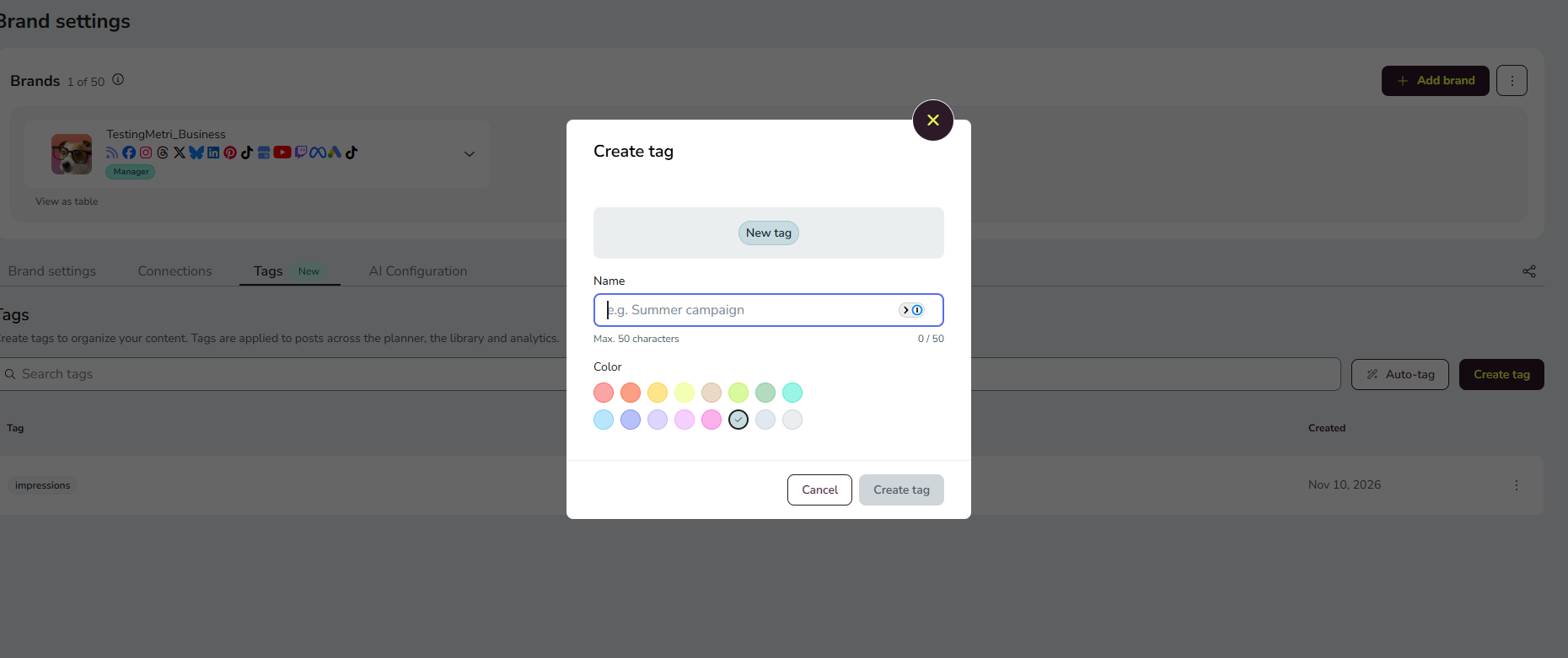
A tag needs a name; the color is optional. Tag names are unique within the brand, and the comparison ignores capitalization, so you can't create a tag that only differs from an existing one in uppercase or lowercase. Several tags can share the same color.
Click ☰ to open the side menu.
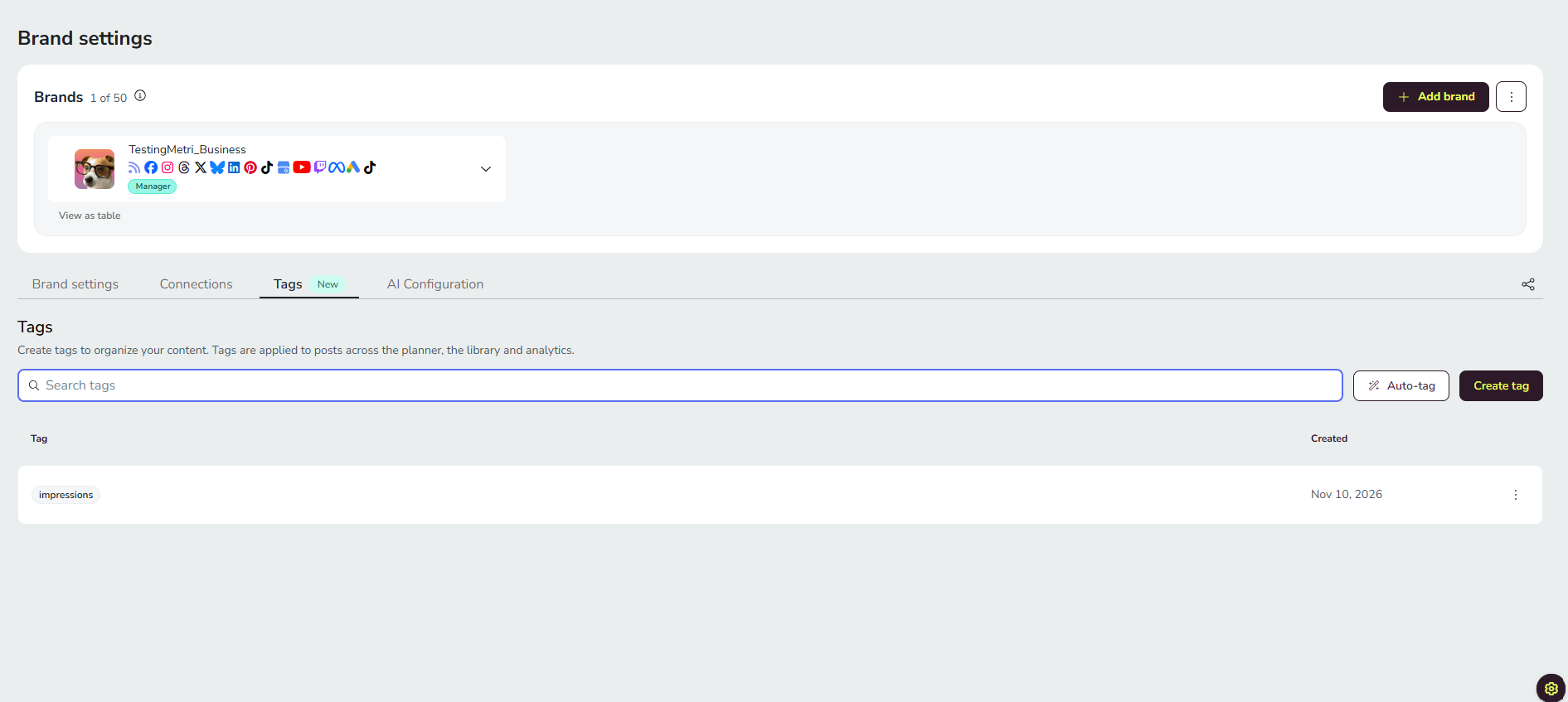
Go to Brand settings and open the Tags tab.
Choose the option to create a new tag.
Enter the tag name.
Optional: pick a color from the preset palette.
Save the tag.
Edit a tag
You can change a tag's name and color at any time, and the change applies everywhere the tag is used.
Open the Tags tab in Brand settings.
Open the tag's action menu and choose Edit.
Update the name or pick a new color from the preset palette.
Save the changes.
Delete a tag
Delete a tag you no longer use from the Tags tab in Brand settings. A confirmation warns you before the deletion completes.
Open the Tags tab in Brand settings.
Open the tag's action menu and choose Delete.
Confirm the deletion in the warning that appears.
Deleting a tag removes it from every item that uses it, including published posts in content analytics.
Tag limits per brand
Each brand supports up to 300 tags, and each post up to 20.
At 250 tags: a warning tells you that you are approaching the limit.
At 300 tags: you can't create more tags until you delete some. This applies everywhere tags are created: Brand settings, the tag selector, and CSV import.
Permissions for tags
Creating and applying tags follows the permissions of the content being tagged. In this version, that's the permission to create or schedule posts. Editing or deleting tags requires brand management permissions.
Where tags are available
Tags are available on all paid plans. On the Free plan, tag management is view-only: tags can't be created, edited, or deleted. The action buttons remain visible, and selecting one opens a window explaining what tags let you do on paid plans. Existing tags stay visible everywhere, and the tag filter keeps working.
Mobile app: you can create, edit, and delete tags, apply and remove them, filter by tag, and bulk edit tags in analytics. AI auto-tagging is web only for now.
Integrators and White Label agencies: tags work with the same behavior for end clients.
Good to know
Limit: 300 tags per brand, with a warning at 250.
Unique names: two tags in the same brand can't differ only in capitalization.
Colors: optional, chosen from a preset palette, and shareable across tags. Tags created on the fly start without a color.
Free plan: tags are view-only.
FAQs
Can two tags have the same color?
Why can't I create a tag that only changes the capitalization of an existing one?
Tag names are unique within the brand, and the comparison ignores capitalization, so a name that only differs in uppercase or lowercase counts as a duplicate.
Why does a tag I created while tagging content have no color?
Tags created on the fly from the tag selector are created without a color. Assign one later from the Tags tab in Brand settings.
What happens when I reach 300 tags?
You can't create more tags until you delete some. The limit applies to Brand settings, the tag selector, and CSV import.
What happens to my posts when I delete a tag?
The tag is removed from every item that uses it, including published posts in content analytics.
Related articles
Was this helpful?
Was this helpful?