
How to see the detailed evolution of your posts (up to their first 30 days)
Updated 2 months ago
Available for Advanced plans or higher by default. Starter plans can also access it with the Advanced Analytics add-on. Not available on the Free plan.
Extended to 30 days with the Advanced Analytics add-on.
Content behavior on social media has changed: posts are no longer short-lived pieces that only perform in their first hours. They can continue growing days later, and it is during the first 15 days (or 30 days with the Advanced Analytics add-on) that most of their performance is defined.
That’s why analyzing daily or cumulative evolution is important: it helps you understand what type of content works and use those insights to optimize your future posts.
Availability by social network
Detailed evolution is available depending on the social network and content type.
Social network | Content type | Data availability |
|---|---|---|
Posts and Reels | Since November 1, 2024 | |
TikTok | Posts | Since December 24, 2024 |
Posts | Since February 16, 2025 |
Detailed data is organic and available from the dates indicated. It requires the Advanced plan or higher by default; Starter plans also get access when they activate the Advanced Analytics add-on. Not available on the Free plan.
What can you see in this analysis?
The detailed analysis lets you see how the performance of each post changes from the day it is published.
You can:
Analyze the evolution of your posts during their first 15 days on Advanced or higher plans, or 30 days with the Advanced Analytics add-on (Starter plans included).
Identify which content performs better based on real behavior.
Review key metrics such as organic views per day or interactions per day (likes, comments, saves, shares).
View charts that help you detect peaks, drops or patterns.
Choose how you want to view your detailed analytics:
▪️ Cumulative, to see total growth.
▪️ Daily, to analyze performance for each specific date.
How to access the detailed analysis
Go to Analytics for the social network you want to review.
In the corresponding section, scroll down to the List.
Select the post you want to review and click “Advanced analytics” to see its detailed evolution.
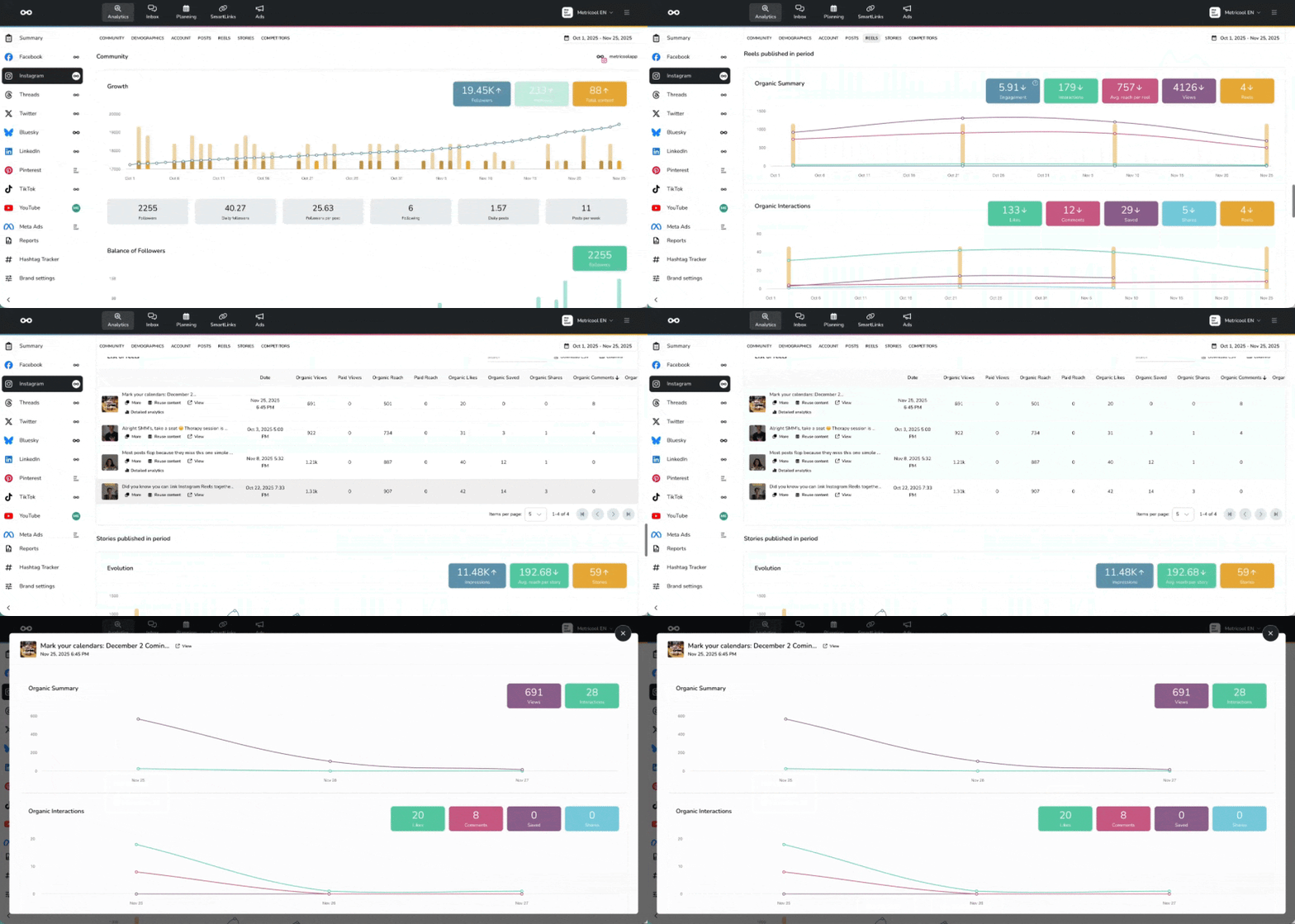
How to interpret the data
The charts show two complementary views:
Daily view: Shows the specific performance for each day. Ideal for identifying when a post had an interaction spike or when it stopped growing.
Cumulative view: Shows total growth from the publication date. Useful for understanding the overall trend and comparing total performance between posts.
Compare similar posts to identify patterns. If one Reel keeps growing after day 7 while another stops at day 3, you can analyze the differences (topic, format, posting time) to replicate the success.
Available metrics
In the detailed evolution you can analyze how the main metrics of each post change during its first 15 days on Advanced or higher plans, or 30 days with the Advanced Analytics add-on (Starter plans included).
Available metrics include:
Organic views: Number of times your content was viewed organically (without promotion).
Likes: Daily or cumulative evolution of likes.
Comments: How conversation grows around your post.
Saves: How many people save your content to view later (Instagram only).
Shares: Times your post was shared.
Available metrics may vary depending on the social network. Check the guide Your metrics in Metricool to see the full definition of each metric by social network.
Saves and shares are strong indicators that your content provides value. Pay special attention to posts with high values in these metrics.