
It unlocks full access to Metricool Studio, Campaign Dashboards, and Detailed Analytics (30-day extended post performance) across all brands in your account.
Your Guide to the Advanced Analytics Add-On
Updated 2 weeks ago
The Advanced Analytics add-on extends Metricool's analysis capabilities beyond what your base plan includes. It is purchased at the account level and unlocks expanded use of three features across all your brands:
Metricool Studio
Campaign Dashboards
Detailed Analytics (extended post performance)
Unlike the X add-on, which is managed per brand, the Advanced Analytics add-on is activated at the account level and applies to all brands connected to Metricool.
Check current pricing on the Metricool pricing page. The add-on starts from 10€/12$ per month on the Starter plan and 30€/36$ per month on the Advanced plan. The billing cycle for the add-on follows the same cycle as your main plan (monthly or annual). You can view the exact add-on price for your plan on the pricing page, or add it at checkout to see the full calculation before completing the purchase.
What the Add-On Unlocks
Feature | Free | Starter / Advanced (without add-on) | With Advanced Analytics add-on |
|---|---|---|---|
Metricool Studio | No access | 2 views, max. 10 versions per view | Full access (subject to fair use) |
Campaign Dashboards | No access | 3 dashboards per brand | Full access (subject to fair use) |
Detailed Analytics | No access | 15 days (Advanced only) | 30 days |
Starter plans can also get detailed analytics with the higher 30-day window when the add-on is active. With the Advanced Analytics Add-on, you can also delete Metricool Studio views and Campaign Dashboards you no longer need. Without the add-on, you can delete Studio views to make room for a new one when you reach the 2-view limit, but Campaign Dashboard deletion is not available.
How to Add the Advanced Analytics Add-on
This video is in English only
Click ☰ in the top menu, then select Plans and billing.
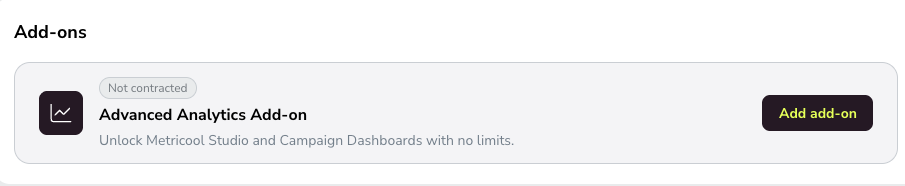
In the Add-ons section, find the Advanced Analytics Add-on card and click Add add-on.
Toggle the Advanced Analytics add-on switch to on.
Click Continue and complete the payment process to activate the add-on.
Manage or Remove the Advanced Analytics Add-on
You can enable or disable the Advanced Analytics add-on at any time from your account settings.
Click ☰ in the top menu, then select Plans and billing.
In the Add-ons section, click Add add-on (or Change if you are already on the plan change screen).
Toggle the Advanced Analytics add-on switch to off.
Click Continue and complete the process to confirm the change.
When you toggle the Advanced Analytics add-on off, the change will take effect on your next billing cycle (monthly or annual). You will retain full access until the current cycle ends.
FAQs
What does the Advanced Analytics add-on unlock?
Is the add-on per brand or per account?
The Advanced Analytics add-on is activated at the account level and applies to all brands connected to Metricool.
Can I use the Advanced Analytics add-on on a free plan?
No, the add-on is available on paid plans only.
How much does the Advanced Analytics add-on cost?
The add-on starts from 10€/12$ per month on the Starter plan and 30€/36$ per month on the Advanced plan. Cost varies by plan. Check the latest prices on the Metricool pricing page. The add-on follows the same billing cycle as your main plan (monthly or annual). You can view the exact add-on price for your plan on the pricing page, or add it at checkout to see the full calculation before completing the purchase. You can cancel before completing the purchase if you decide not to include it.
When do changes take effect?
Adding the add-on takes effect immediately after payment. Removing the add-on takes effect on your next billing cycle.
Do I need to cancel my subscription to remove the add-on?
No. Simply toggle the add-on off in Settings > Plan and Billing. The change will apply on your next renewal.
💬 Need help? Contact our support team via chat or by sending an email to [email protected].
Was this helpful?
Was this helpful?