
How to add competitors in Metricool
Add competitors in Metricool
Analyzing the performance of other accounts in your industry lets you identify trends and compare your key metrics, such as engagement, with the market average.
From the Competitors section, you can monitor other profiles without private access and view their evolution compared with yours.
Add your own account as a competitor. This way, you’ll see how your metrics compare with other profiles. Remember that Competitors shows public data from each account, while connecting your profile with permissions gives you access to more detailed metrics.
Availability by social network
Social network | FREE | Premium |
|---|---|---|
✅ | ✅ | |
Instagram [1] | ✅ | ✅ |
Threads | ✅ | ✅ |
X (Twitter) [2] | ❌ | ✅ |
Bluesky | ✅ | ✅ |
YouTube | ❌ | ✅ |
Twitch | ✅ | ✅ |
📝 Notes
[1] To connect competitors on Instagram, your Instagram account must be linked to Metricool through Facebook. Check the connection types and their differences here.
[2] X (Twitter): available only on Premium with a paid add-on.
Currently, you can’t connect competitors on other social networks outside the ones listed above.
How does it work in each plan?
With the FREE plan, you can explore the feature with a demo:
Connect up to 5 accounts per social network.
You can’t edit or delete them once they’ve been added.
On YouTube, two competitor accounts are shown by default, with no option to add more.
With Premium plans, you have more control and options:
Connect up to 100 competitors per social network (up to 10 on YouTube).
Manage, edit, and adjust accounts according to your strategy.
How to add competitors
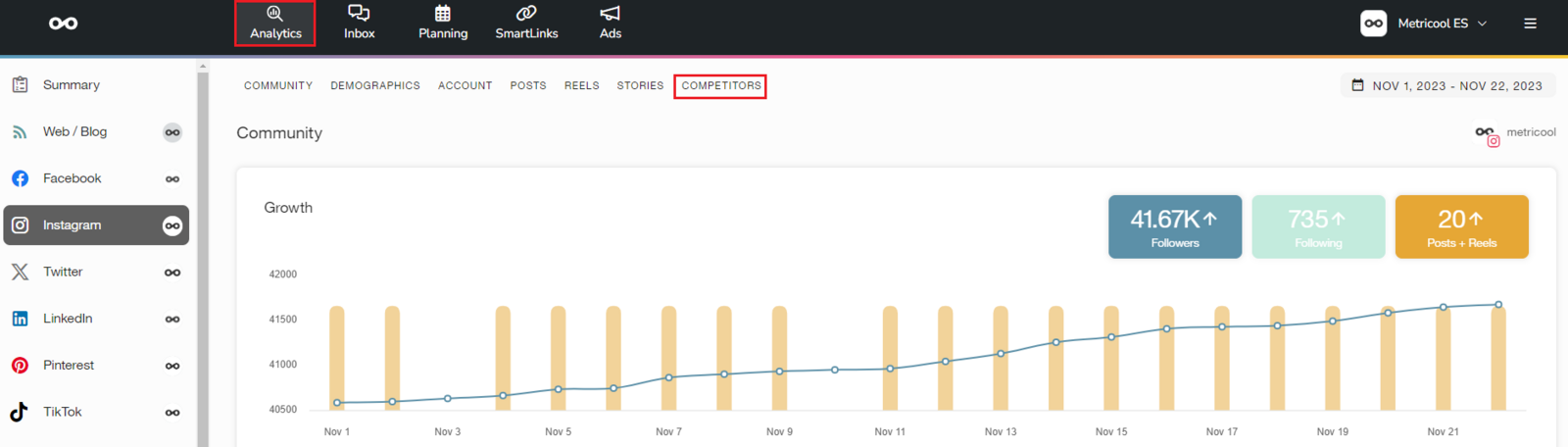
Go to Analytics
Access the Competitors section
Click Add
Enter the name or search for the competitor depending on the social network
Finish by clicking Add
Below, you’ll find the details by social network.
How it works on each social network
Search for the page using the search bar and select one of the suggestions.
You can only add pages (not personal profiles)
Enter the exact competitor name.
You can only add professional accounts.
Threads
Enter the exact competitor name.
The account must be public, >18 years old, and have >100 followers
X (Twitter)
Search for the account using the search bar and select one of the suggestions.
Available only on Premium with add-on
Some accounts may not appear (private or not indexed)
Bluesky
Search for the account using the search bar and select one of the suggestions.
YouTube
Search for the channel name or add the channel URL (it must include
/channel/or/user/)Available only on Premium plans (maximum 10 competitors).
Twitch
Enter the exact competitor name.
Check out this tutorial on competitor analysis with Metricool.
Check the available metrics here