
How to Connect X (Twitter) to Metricool
Updated 3 months ago
To connect to X (Twitter), you must add an add-on to your paid subscription. Find the details here.
When you connect your X account to Metricool, you can:
Schedule and publish: learn how to manage your content here.
Analytics: make the most of your data by checking available metrics here.
Inbox: reply to direct messages and stay organized by adding internal notes. Check out the details here.
Competitors: monitor competitors and optimize your strategy. More info here.
How to connect your X account
To connect X, you must have the account login credentials, as there are no admin permissions here.
Follow these steps:
Open a new tab and log in at X.com
In Metricool, go to the connections panel.
Click "Connect account." A pop-up window will appear.
Log into your X account and grant Metricool access by accepting the permissions.
⚠️ Due to changes in the X (Twitter) API, you may need to accept two authorizations to complete the connection flow, as shown in this image:
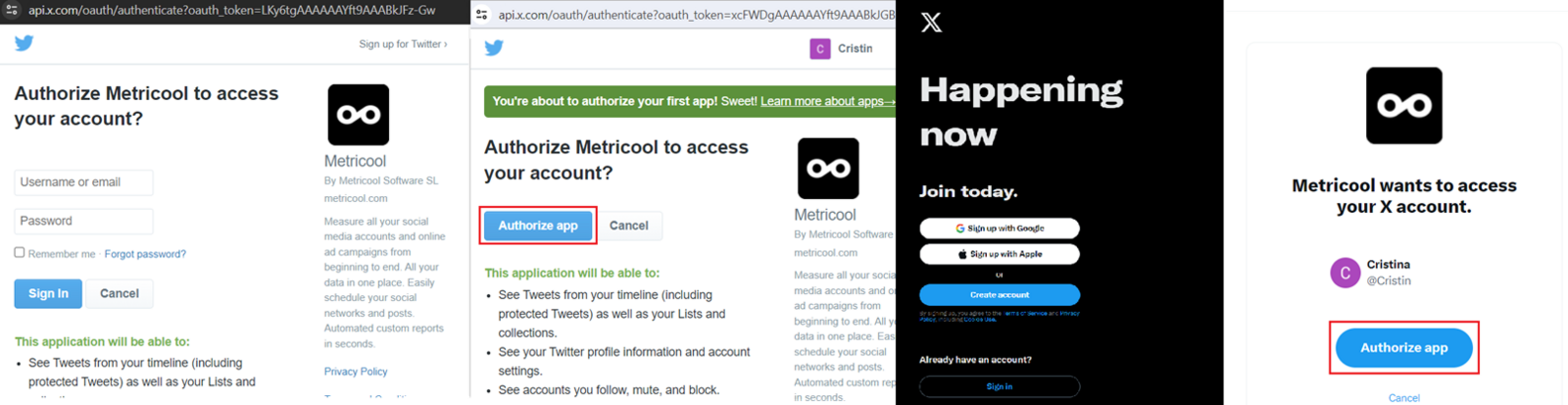
Once permissions are accepted, your X account will appear as connected.
Having trouble connecting your account?
If a different account was connected, we explain how to switch accounts here.
And if something isn’t working as expected when trying to connect X (Twitter), don’t worry. We’ve gathered the most common cases and solutions in this article:
👉 I can't connect X (Twitter).