
No, to manage X/Twitter you need to upgrade to a paid plan (Starter or higher). See the section "Upgrade your plan if you're on the Free plan".
Your Guide to the X/Twitter Add-On
Updated 3 months ago
The X/Twitter add-on lets you connect and manage X/Twitter accounts in Metricool. Because X charges for every API connection, Metricool offers this access as a paid add-on separate from your main plan.
The add-on is available for paid plans (Starter or higher) at €10/$10 per month per connected X/Twitter account. On an annual plan, each add-on costs €120/$120 per year. The billing cycle matches your main Metricool plan.
Current pricing took effect on July 13, 2026.
If you already had X/Twitter add-ons active before July 2026, you may be on a different price. See the FAQs for details on legacy pricing.
Each add-on covers one X/Twitter account per brand. If you need to connect more accounts, you must add one add-on for each account, up to the limit included in your plan.
Do You Need the Add-On?
I have a Free plan
To connect or manage X/Twitter, you must upgrade to a paid plan (Starter or higher). You can add the X/Twitter add-on during the upgrade process. See Upgrade your plan if you're on the Free plan.
I have a paid plan and want to add X/Twitter
Go to Settings > Plan and Billing to add the add-on. See Add the X Add-On to your current subscription.
I have a paid plan and want to remove X/Twitter
You do not need to cancel your subscription. Reduce the number of X/Twitter add-ons to 0 in Settings > Plan and Billing before your next renewal. See Reduce add-ons.
If you remove all X/Twitter add-ons, you may lose any previous pricing permanently. Check the FAQs before making this change.
How to Add an Add-On

Upgrade your plan if you're on the Free plan
If you're using Metricool with a Free plan, the first step to manage X/Twitter is to upgrade to a Starter plan or higher:
Log in to your Metricool account.
Click on the upgrade option in the app.
Select the plan that best fits your needs. You can view them here.
During the subscription process, include the add-ons you need (1 add-on per brand, up to the limit included in your plan).
Complete the upgrade process with your preferred payment method.
Add the X Add-On to Your Current Subscription
Go to Settings > Plan and Billing.
Click on Change, and select the add-ons (1 add-on per brand, up to the limit included in your plan).
Click Continue and complete the add-on payment ( €10/$10 per month) to activate the connection.
Manage Your Add-Ons
From your account settings, you can modify the number of add-ons, adding as many as your plan allows for each brand or reducing the current number to remove X connections you no longer need.
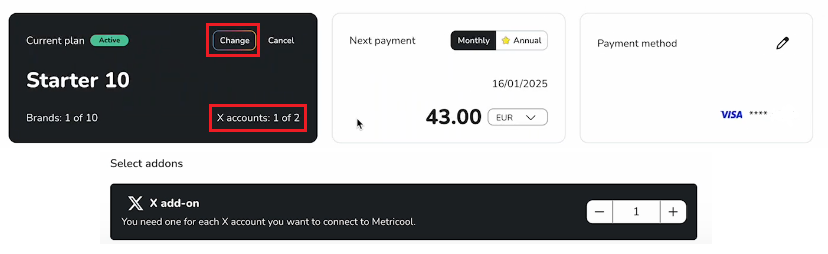
Increase Add-Ons
Click on Change and increase the add-ons (1 add-on per brand, up to your plan’s limit).
Click Continue and complete the payment for the add-on (€10/$10 per month or the applicable prorated amount) to activate the account connection.
Reduce Add-Ons
Click on Change and decrease the add-ons.
Click Continue and complete the process to remove the specified add-ons. The change will take effect in your next billing cycle.
If you remove all X/Twitter add-ons, you may lose any previous pricing permanently. Any future X/Twitter add-ons will be charged at the current rate. See the FAQs for more details.
FAQs
I have a Free plan, can I still use X/Twitter?
What if I want to cancel my X/Twitter connection but keep my current plan?
There's no need to cancel your subscription or change your plan. Simply adjust the number of add-ons to 0 before your next renewal.
How much does the X/Twitter add-on cost per year?
The current X/Twitter add-on costs €120 / $120 per year for each connected account. The payment method depends on the billing cycle of your main Metricool plan:
Monthly plan: you pay €10 / $10 per month for each add-on (12 payments of €10 = €120 per year)
Annual plan: you pay €120 / $120 in a single annual payment for each add-on. The total price of the add-on is the same regardless of your billing cycle; the only difference is whether you pay monthly or in a single annual payment.
If you already had X/Twitter add-ons contracted before July 2026, you keep the previous price of €60 / $60 per year (or €5 / $5 per month). If you remove all X/Twitter add-ons, you lose this legacy price permanently and any future add-ons will be charged at the current rate.
How does the add-on appear on my invoice?
When you purchase your plan or when it renews, the cost of the add-on is included on the same invoice as your main subscription. If you add an add-on before your next renewal, you’ll receive a separate invoice with the prorated amount until your next billing cycle.
How many X/Twitter accounts can I connect with an add-on?
Each add-on allows you to connect one X/Twitter account per brand. If you need to connect more accounts, you'll need to add an additional add-on for each account, up to the limit allowed by your plan.
When do changes take effect?
If you add an add-on to your subscription, the change will take effect immediately, and the cost (total or proportional) will be charged.
If you reduce your add-ons, the change will take effect starting from your next renewal.
I already had X/Twitter add-ons before July 2026. Will my price change?
No. If you already have X/Twitter add-ons active on your account, you keep the previous price of €5 / $5 per month (or €60 / $60 per year) for each existing and additional add-on, as long as you do not remove all of them.
What happens if I remove all X/Twitter add-ons?
If you remove all X/Twitter add-ons from your account, you lose the previous price permanently. Any future X/Twitter add-ons will be charged at the current price of €10 / $10 per month (or €120 / $120 per year). This also applies if you cancel your full subscription and subscribe again later.
💬 Do you have questions or need help?
If you need more information or have questions about purchasing or managing the add-on, don't hesitate to contact our support team via chat or by sending an email to [email protected].
Was this helpful?
Was this helpful?