
Schedule and edit posts through an LLM with Metricool's MCP
Updated 3 months ago
When you schedule or edit a post through an LLM connected to Metricool, the LLM response includes a direct, clickable link to that post inside Metricool. Use it to open the post immediately, review it visually, adjust attachments or formatting, and confirm the action went through.
What you need
A Metricool account with an active MCP connection. See How to connect Metricool's MCP for setup steps, or the client guides for ChatGPT and Claude.
A connected LLM client that supports MCP (Claude, Cursor, and others via
https://ai.metricool.com/mcp).At least one brand configured in Metricool.
Note on ChatGPT compatibility The native Metricool app inside ChatGPT uses an earlier version of the MCP integration. As a result, the direct post link described in this article is not yet available when scheduling through the ChatGPT app. Updating the ChatGPT integration depends on ChatGPT's review and acceptance process, which is outside Metricool's control. In the meantime, ChatGPT users with a paid Metricool account can connect manually via
https://ai.metricool.com/mcpto access the full feature set. See How to connect Metricool's MCP with ChatGPT.
Schedule a post through an LLM
Ask your LLM to schedule a post for a specific brand, account, date, and time. Include the content text and any attachments or formatting you want.
The LLM uses the
create_scheduled_posttool to create the post in Metricool.Check the LLM response. It includes a direct link to the scheduled post in Metricool.
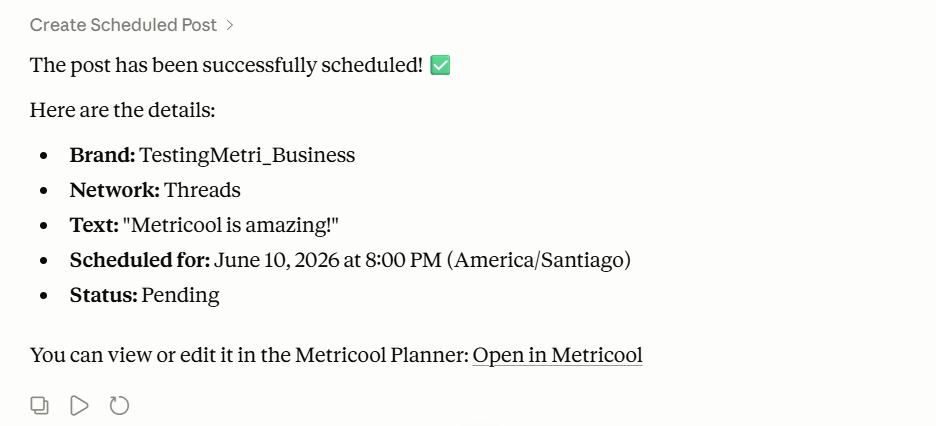
Claude response showing the scheduled post confirmation and direct link to the Metricool Planner. 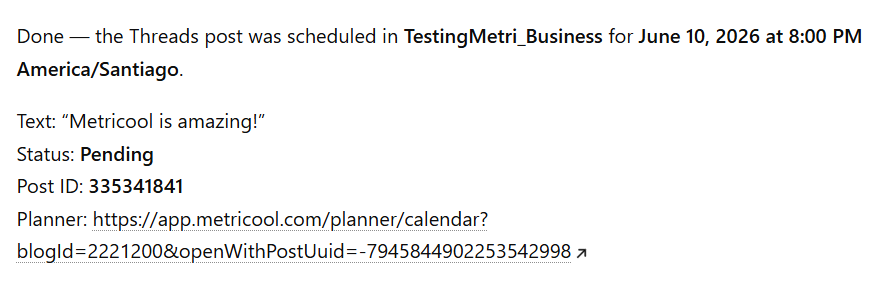
ChatGPT response showing the scheduled post confirmation and direct link to the Metricool Planner. Click the link to open the post in the Metricool planner. Review the post, attachments, and formatting. Make any tweaks before publishing.
Edit a scheduled post through an LLM
Ask your LLM to update an existing scheduled post. Mention the brand, the post, and what you want to change (text, date, time, attachments, or format).
The LLM uses the
update_scheduled_posttool to apply the changes.Check the LLM response. It includes a direct link to the updated post.
Click the link to open the post in the Metricool planner and verify the edits.
Why this helps
Visual confirmation: Open the post in Metricool to see exactly how it looks with attachments and formatting.
Quick tweaks: If the LLM did not set the image crop, caption, or formatting exactly right, click through and fix it without searching the calendar.
Proof of action: The link is tangible confirmation the post was created or updated in Metricool.
One-click access: Keep Metricool one click away from your LLM workflow.
Limitations and notes
Direct post links appear in the LLM response after scheduling or editing through the MCP. They are not sent separately.
The native ChatGPT integration does not yet support this feature. Availability there depends on ChatGPT's MCP review process.
Your plan limits apply. For example, free accounts cannot schedule more than 20 posts.
Some advanced formatting or attachment adjustments may still need to be made directly in the Metricool planner.
Related articles