
How to add a location to my post
Updated 6 months ago
Add location to Facebook and Instagram posts
You can tag specific locations in your Facebook and Instagram posts directly from Metricool’s planner. The location will appear in your published post just as it would when publishing directly on each platform.
You can only add one location per post:
Instagram: feed posts, Reels, and test Reels (not available for Stories).
Facebook: only in page posts (not available for Reels or Stories).
To add locations on Instagram, the auto-publish option must be enabled
How to add a location
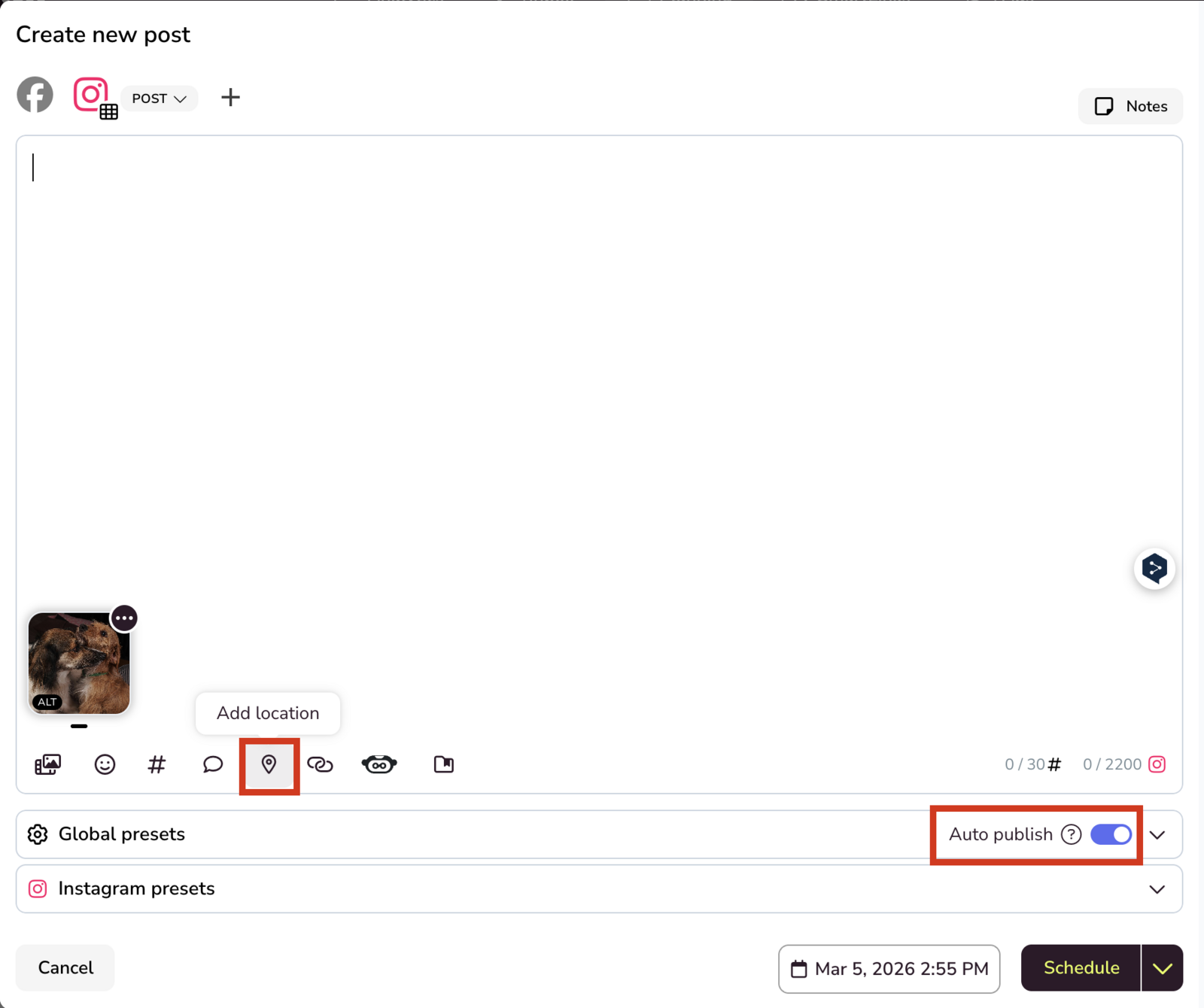
The location search shows places provided by Meta (cities, businesses, points of interest). If you can’t find a specific location, try more precise addresses (street, postal code) or official business names.
Open the planner and create your Facebook or Instagram post.
Click the location icon (the map pin).
Type the name of the place you want to tag in the search field.
Select the correct location from the results list.
Schedule your content using the options available in the dropdown.
📝 Notes
Location search depends on the Meta API. If a location doesn’t appear in the results, it means Meta doesn’t have it registered in its database or it’s temporarily unavailable through its API.
If a location isn’t available on Instagram:
Disable auto-publishing and receive a Metricool notification to publish manually and add the location from Instagram. More details here.
Publish directly from the Instagram app to use its native location search.