
Schedule and publish on Facebook
Updated 3 weeks ago
Schedule and publish Facebook Posts, Reels, and Stories from the Planning tab in Metricool. If you have not connected a Page yet, connect Facebook first.
Good to know
Content: Publish Posts, Reels (3 to 90 seconds), and Stories (up to 60 seconds). You can add a title to posts with videos or Reels.
Attribution label: Posts published through Metricool show a “posted with Metricool” label only in the admin view. It is not visible to the public on Facebook. The label is added by Facebook and cannot be modified.
Media: Attach images (up to 35 per post), a video, or a GIF. Mixing formats is not allowed.
Multi-link carousels: Metricool doesn't currently support publishing Facebook carousels with an individual title, description, and link per card. You can attach up to 35 images in a single post.
Character limit: 16,192 per post.
Alt text: Supported. Click the ALT button to add alt text.
Mentions: Tag up to 3 Pages (for example, @metricool). Autocomplete helps you select the right name.
First comment: Click the message icon to write a first comment with extra details such as hashtags or CTAs. See How to schedule a first comment on your posts.
Location: Click the map icon and search for a place to tag. Autocomplete suggests locations from Facebook’s API. If a location does not appear, try a more specific or full name.
Reels as Stories: a Reel posted as a Story on a Facebook Page cannot exceed 60 seconds.
Promotion: to promote posts, first connect a Meta Ads account.
How to create a post
Go to the Planning tab in the top menu and follow these steps:
Click + Create new post and select Facebook.
Select the format of the post you want to schedule: Post, Reel, or Story.
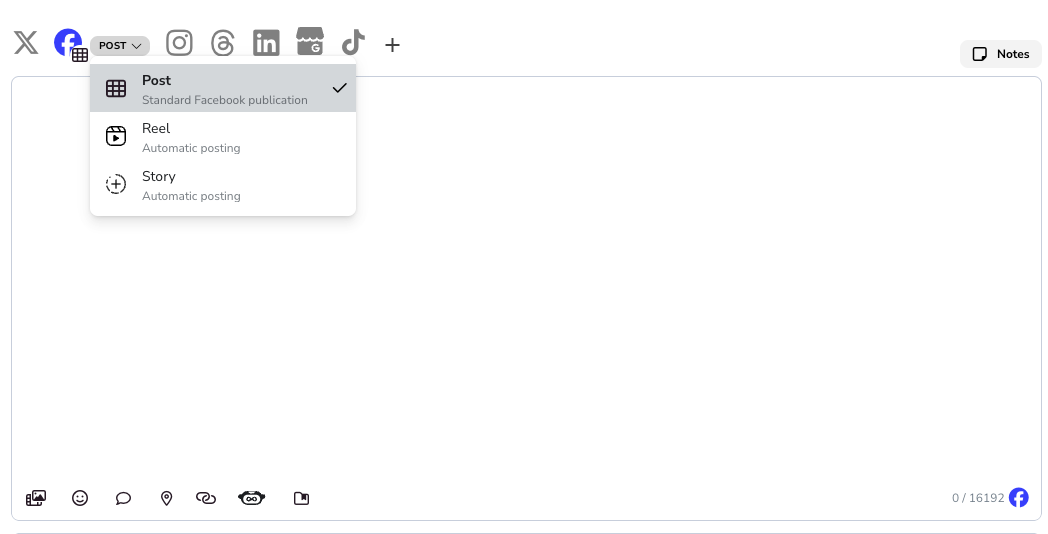
Add your text (up to 16,192 characters). You can mention other Pages (for example, @metricool).
Optional: Upload media files.
Global settings: enable the URL shortener and select SmartLinks if needed.
Facebook settings: enable post promotion and add a title (for video posts or Reels) if needed.
Choose the date and time, then save the post.
You can also schedule Facebook content from an autolist.
Image and video requirements
Facebook also supports posts in 1080 × 1350 px. Use this vertical format when you want content optimized for both Facebook and Instagram.
Image specifications
Format: JPEG or PNG
Size: up to 30 MB
Resolution for square posts: 1200 × 1200 px
Resolution for horizontal posts: 1200 × 900 px
Linked images: 479 × 246 px on computers; minimum 320 px wide on mobiles
Video specifications
Format: MP4, MOV, or GIF
Size: up to 500 MB
Duration: 1 second to 240 minutes
Aspect ratio: 1:1 (PC or mobile) or 4:5 (mobile only)
Video settings: H.264 compression, square pixels, fixed frame rate, progressive scan, and stereo AAC audio from 128 kbps
Resolution: minimum 1080 × 1080 px
Animated GIFs: minimum height and width 120 px
Reels specifications
Duration: 3 to 90 seconds
Resolution: minimum 540 × 960 px
Aspect ratio: between 1.91:1 and 9:16
Frame rate: 23–60 FPS
A Reel published as a Story on a Facebook Page cannot be longer than 60 seconds.
Stories specifications
Story images
Format: JPEG, PNG, or GIF
File size: 4 MB maximum (for PNG, 1 MB maximum is recommended to avoid pixelation)
Aspect ratio: 9:16 recommended to avoid cropping or blank space
Story videos
Format: MP4
Audio codec: AAC, 48 kHz sample rate maximum, stereo
Video codec: H264/H265, progressive scan, closed GOP (2 to 5 seconds), 4:2:0 chroma subsampling
Frame rate: fixed
Resolution: 1080 × 1920 recommended; minimum 540 × 960 px
Aspect ratio: 9:16
Audio bit rate: 128 kbps or higher
Duration: 60 seconds maximum
Related articles