
Schedule and Publish on YouTube
Updated last month
You can schedule and automatically publish your videos to your YouTube channel from Metricool. If you haven't connected YouTube yet, connect your YouTube account first.
Keep in mind the following duration limits: Shorts should not reach the 2:59 min limit, as YouTube may slightly extend the video during processing, which could result in it being published as a standard video. Unverified channels can't upload videos longer than 15 minutes. If you're uploading longer videos, make sure your channel is verified with your phone number at https://www.youtube.com/verify.
Good to know
Video types: Standard videos are longer than 60 seconds and horizontal. Shorts are up to 3 minutes and vertical or square.
Publishing limits: FREE up to 10 posts every 24 hours; paid plans up to 20 posts every 24 hours. If you reach the limit, wait 24 hours from your 10th or 20th post (depending on your plan). To check if you can publish, count your posts from the last 24 hours: if they're below the limit, you'll be able to schedule new ones.
Character limit: 5,000 per post.
Thumbnail: Available for videos (1280 x 720 px, 16:9) and shorts (1080 x 1920 px, 9:16). For shorts, it only shows as the cover if your channel is verified and YouTube has enabled Shorts thumbnails on your account.
First comment: You can add it to both long-form videos and Shorts.
Add to playlist: You can schedule videos and choose the playlist they will be published in.
Notify subscribers: Choose whether to notify your subscribers when the video or Short publishes. You can only set this during upload, since YouTube doesn't allow changing it after the video is live. If you don't choose an option, subscribers are notified, matching the previous behavior.
Video requirements
Requirement | Video |
|---|---|
Format | MP4 or MOV |
Size | Up to 500 MB |
Standard videos | Over 60 seconds, horizontal format |
Shorts | Up to 3 minutes, vertical or square format |
How to create a YouTube post
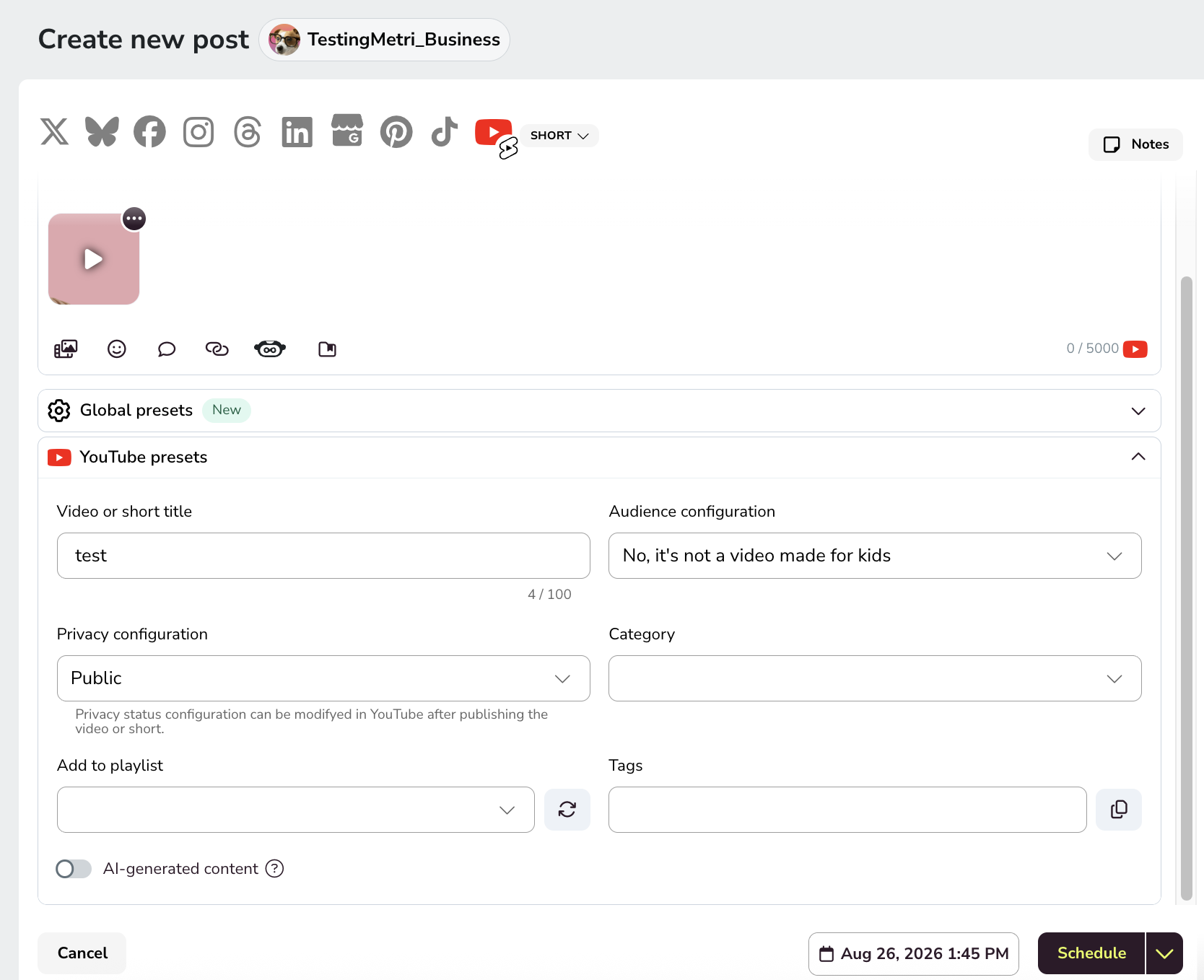
To schedule a YouTube video, go to the Planning tab in the top menu and follow these steps:
Create a new post
Click "+ Create new post" to open the post creator, then select YouTube as the network.
Add the description
Add the text to include a description. Descriptions for YouTube Shorts and the mobile version of YouTube videos won't preview here, but will be included in your post.
Upload the video
Remember:
Standard video: 60+ seconds, horizontal.
Shorts: up to 3 minutes, vertical or square.
Optionally add a thumbnail as the cover. For Shorts, it only shows as the cover if your channel is verified and YouTube has enabled Shorts thumbnails on your account. Learn how to add a cover to your posts.
Complete YouTube settings
Title: Max 100 characters.
Audience settings: Specify if the video is made for kids.
Privacy settings: Choose between Public, Unlisted, or Private. You can adjust privacy on YouTube after publishing.
Category: Pick the right category for your content.
Add to playlist: Choose the playlist where your video will be published. If you can't find it, click Refresh to reload the options.
Tags: Add tags to improve searchability and ranking.
Notify subscribers: Choose whether to notify subscribers when the video publishes. This applies to both videos and Shorts. You can only change it during upload, and if you leave it unset, subscribers are notified.
AI-generated content: Turn on the toggle to flag the video as AI generated or altered content. The flag is saved with the scheduled post and sent to YouTube at publishing time. Available on web; the mobile post creator will include it in a future release.
Choose publish date and time
Choose the publish date and time, then save.
Done! Metricool takes care of the rest.