
API access is available only on Advanced and Custom. Starter and Free do not include the API. After an eligible upgrade, open Account Settings > API to copy your token. Metricool MCP is available on any plan, including Free, and is a different product from the API. See MCP vs API access: what is the difference?.
How to manage my plan in Metricool
Updated 3 weeks ago
Manage purchase, plan changes, and cancellation from the Metricool website, not the mobile app. The only exception is a plan bought through the App Store or Google Play. See Starter Mobile 5: subscribing from the app
Change your plan, switch monthly or annual billing, manage add-ons, or cancel from Plan and Billing in your Metricool web account.
Before you change anything
Open Plan and Billing, confirm your current plan and renewal date, and make sure billing details are ready.
Click ☰ in the top menu, then select Plan and Billing (or open it from the top-right menu shortcut).
Review your current plan, billing cycle (monthly or yearly), and renewal date.
Confirm you have a valid payment method (card or PayPal) and that your billing details are up to date.
If you need more than one subscription change at once (for example, change plan and change billing cycle), complete them as two separate steps. Finish the first change, then start the next one from account settings.
To understand what each plan includes, how add-ons are billed, and which plans include API access, see Plans, add-ons, and API access explained.
Change your plan
Use Change plan in Plan and Billing to move to a different plan.
In Plan and Billing, click Change plan.
If you previously canceled, click Reactivate plan first, then make changes.
Select the new plan and confirm the change. The exact amount due is shown before you complete payment.
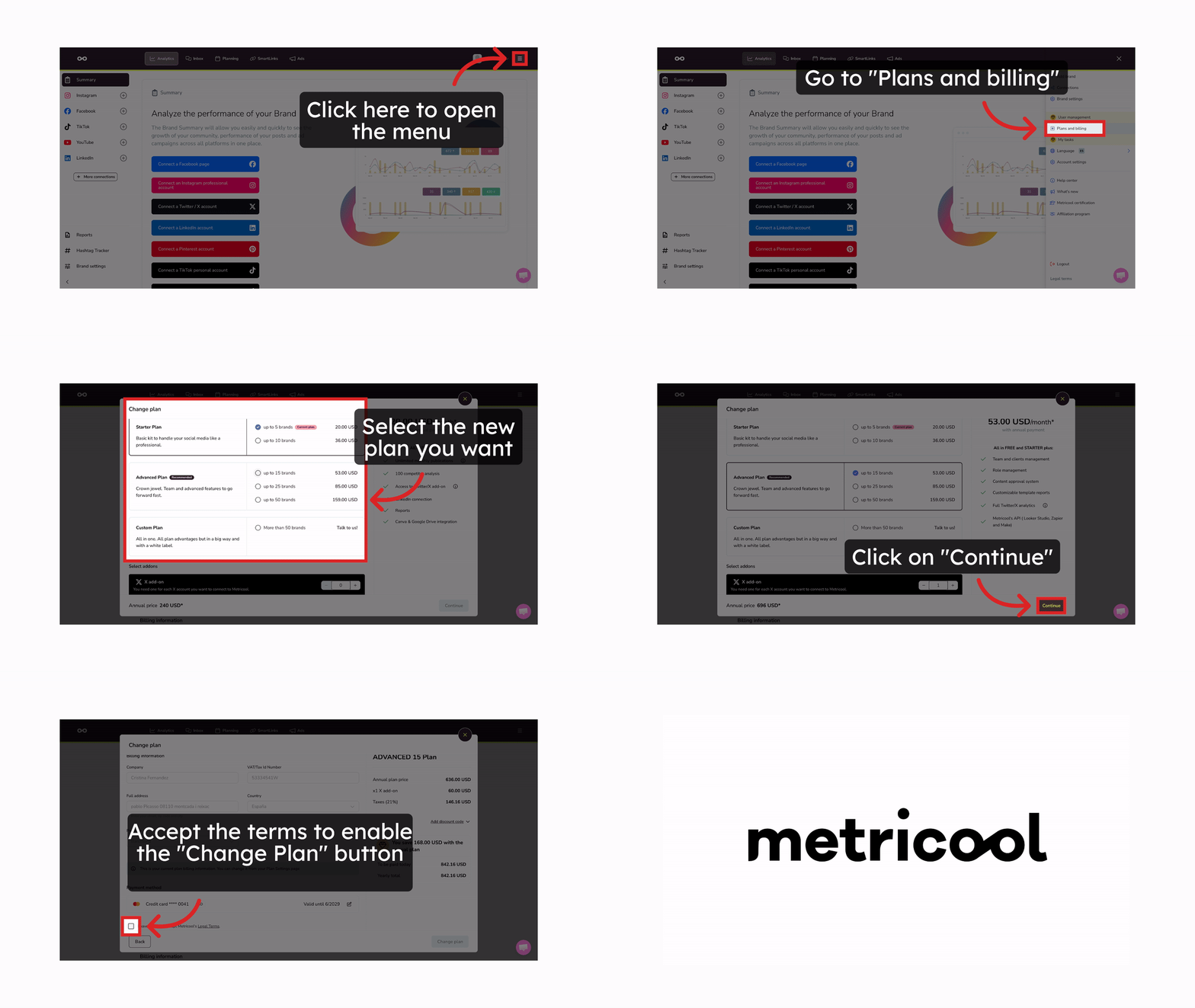
Upgrade to a higher plan
You can upgrade at any time. The new plan takes effect immediately.
Unused time on your current plan is prorated and deducted from the new plan price.
For annual subscriptions, the billing cycle also updates. For example, if your plan renews January to January and you upgrade in May, the next renewal is in May of the following year.
New plan features, including API access on Advanced or Custom, unlock as soon as the upgrade completes.
Downgrade to a lower plan
Downgrades use the same Change plan path, but the lower plan starts at the end of your current billing period.
When the lower plan has fewer brand slots, Metricool keeps your oldest brands by creation date. The confirmation screen shows which brands you keep and which you lose access to.
If you want to keep different brands than the ones selected, delete the unwanted brands from the Connections panel before you complete the downgrade. After the downgrade finishes, that automatic selection cannot be changed. Learn how to add or delete brands.
Change your billing cycle
You can switch between monthly and yearly billing from the Metricool website. The path and timing differ by direction.
Switch from monthly to annual
The switch takes effect immediately, and unused time on the monthly plan is prorated against the annual price.
In Plan and Billing, open the next payment information section.
Select Annual.
Complete the change. The amount due is shown before you confirm.
The annual price already includes the annual discount.
Switch from annual to monthly
The change takes effect at the end of your current annual term. Until then, you keep your paid annual plan, and monthly billing starts when that period ends.
To request the change, contact support through online chat or [email protected].
Manage add-ons without canceling your plan
Add-ons are optional and billed separately from your base plan. You can add or remove them without canceling the subscription.
Advanced Analytics is an account-level add-on for all brands. Adding it takes effect after payment; removing it takes effect on the next billing cycle. See Your Guide to the Advanced Analytics Add-On.
X/Twitter is billed per connected account. Adding takes effect after payment; reducing takes effect on the next billing cycle. See Your Guide to the X/Twitter Add-On.
Manage both from Plan and Billing under Add-ons or by using Change on the plan screen.
Cancel your subscription
Cancel from the website at any time. Your paid plan stays active until the current period ends, then the account reverts to Free.
Deleting your account does not cancel your subscription. Cancel the plan with the steps below before you delete the account, or charges can continue.
Open Plan and Billing on the Metricool website.
Click the vertical three-dot menu (⋮) next to your current plan.
Select Cancel plan and confirm.
After cancellation:
You keep paid-plan access until the current billing period expires.
When the period ends, the account switches to Free (1 brand and other Free limits).
Metricool keeps the oldest brand by creation date. The confirmation screen shows which brands you keep and which you lose access to.
If you want a different brand kept, delete the brands you do not need from the Connections panel before you finish cancellation. After cancellation completes, the automatic selection cannot be changed. Learn how to add or delete brands.
App-managed plans must be canceled in Apple or Google, not in Metricool. See how to manage your plan in the Metricool app.
For withdrawal and refund rules (including the 15-day first-purchase window), see Metricool Refund Policy.
SmartLinks after your account moves to Free
Moving to Free does not delete your SmartLinks, and their public links keep working on every brand. SmartLinks management is a paid-plan feature, so you can't edit or delete them from a Free account.
To take a SmartLink offline, delete it before your paid plan ends. If your account has already moved to Free and the link is still live, contact support through online chat or [email protected] and we'll remove it for you.
Deleting a SmartLink in Metricool does not remove it from the places where you use it. You added the link to those places manually, so remove it yourself from each one, for example from the website field of your Instagram profile (your link in bio).
Troubleshooting
Use these checks when a plan change, cancellation, or feature unlock does not match what you expect.
I upgraded but I still cannot use the API
I canceled but I am still being charged or still see a paid plan
After you cancel, the paid plan stays active until the current billing period ends. Charges stop for future renewals; you are not moved to Free until that period expires. If you deleted the account without canceling first, the subscription can keep renewing. Cancel from Plan and Billing on the website, or from Apple or Google if you subscribed in the app.
I removed an add-on but I still have access or still see the charge this cycle
Removing Advanced Analytics or reducing X/Twitter add-ons takes effect on the next billing cycle. You keep access until the current cycle ends. Adding an add-on is immediate after payment.
I want annual billing, or I am stuck on annual and want monthly
Monthly to annual: in Plan and Billing, use next payment information and select Annual. The change is immediate and prorated. Annual to monthly: the change waits until the annual term ends and must be requested through support (chat or [email protected]).
I cannot change my plan from the mobile app
Website plans are managed only on the Metricool website. Only Starter Mobile 5 bought through the app is managed in Apple or Google. See how to manage your plan in the Metricool app.
After downgrade or cancel, the wrong brand stayed active
Metricool keeps the oldest brand by creation date. To keep a different brand, delete the brands you do not want from the Connections panel before you complete the downgrade or cancellation. After the change finishes, the automatic selection cannot be changed.
My SmartLink is still live after I canceled my paid plan
SmartLinks are not deleted when your account moves to Free, so their public links stay active. Delete the SmartLink before your paid plan ends. If the account is already on Free, contact support through online chat or [email protected] and we'll remove it for you.
Also remove the link from every profile or page where you added it, such as your Instagram link in bio. Deleting a SmartLink in Metricool does not remove it from those places.
Related articles
Was this helpful?
Was this helpful?