
Your Guide to Bluesky with Metricool
By connecting your Bluesky account to Metricool you have acceso to:
Schedule and publish: Get the key tips to manage your content here.
Analytics: Make the most of your data by checking the available metrics here.
Competitors: Keep an eye on the competition and optimize your strategy. More info here.
Bluesky is avaible in ALL Metricool plans
Connect Bluesky
Open a new tab and log in to bsky.app
From Metricool, go to the connections dahboard.
Click on "Connect account". A pop-up window will appear, click on Sign in
Click on your account (or enter your login credentials if requested) and accept all the permissions.
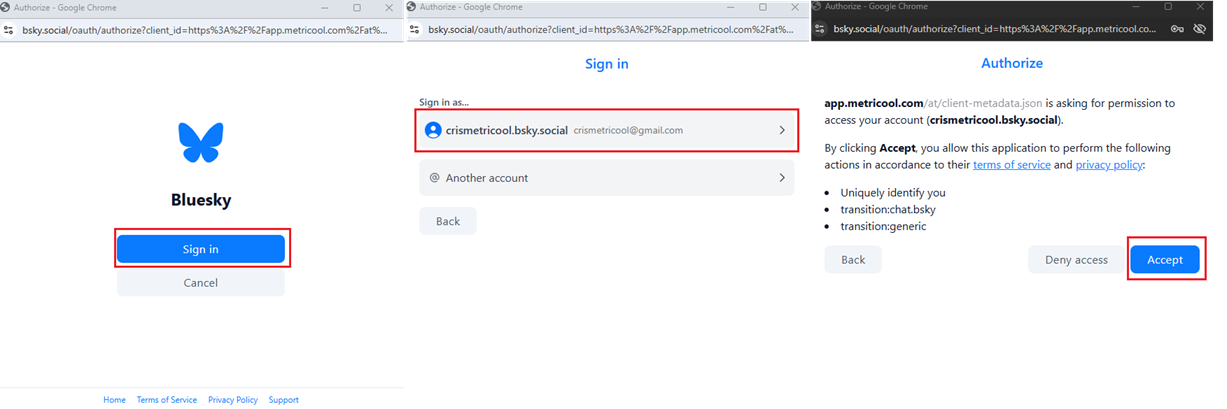
Metricool currently does not support connecting Bluesky accounts with custom domains through the API. The Bluesky integration in Metricool uses the standard handle (.bsky.social), and custom domains (verified handles such as user.yourdomain.com) are not supported in the API authentication flow.
Schedule your content on Bluesky
✏️ Key Insights
Content:Thread creation (up to 80 posts).
Media: Attach images (up to 4 per post), one video, or a GIF. Mixing formats is not allowed.
Character limit: 300 per post.
Alt text: Supported. Click the ALT button to add your alt text.
Mentions: Enter the username (e.g., @metricool.bsky.social). While typing, the autocomplete function will help you select the correct name from the suggested list.
Languages: To help Bluesky better categorize your content, you can select the languages you used in the post text.
How to create a post
To schedule content, go to the Planning tab in the top menu and follow these steps:
Click on "+ Create new post" and select Bluesky
Add the text (up to 300 characters). You can mention other accounts (e.g., @metricool.bsky.social).
Optional: Upload your media files.
Global settings: you can enable the URL shortener and select SmartLinks.
Bluesky settings: add the languages you used in the post text.
Select the time and day and save the post.
💡You can also schedule your Bluesky content from an autolist.*
Image and Video Requirements
➡️ Image Specifications
Allowed per post: 4
Format: JPG/PNG/WEBP/HEIC-HEIF.
Size: Up to 1 MB.
➡️ Video Specifications
⚠️ To post videos, your email must be verified on Bluesky. If it isn't, your videos may be rejected. If this happens, check your email and try posting again.
Allowed per post: 1
Format: MP4 (recommended)/MOV
Size: Up to 50 MB.
Duration: Up to 60 seconds.
🛠️ Coming Soon
Best time to publish