
Instagram Metrics
Updated last month
Instagram switched from Impressions to Views. Full details here 👉 Instagram replaces "Impressions" with "Views": What you need to know
To access all Instagram metrics, your account must be connected via Facebook. If you connect directly from Instagram, access to data will be limited. Check the connection details here.
Instagram account-level metrics include both organic and paid data. In the Posts and Reels sections, an organic data summary is provided, but you can view detailed information on promoted posts by connecting your Meta Ads account. For Stories, only organic data is available.
In addition to scheduling and auto-publishing, you can also boost your Instagram posts and reels from Metricool. Find the information here.
You can review ad campaigns (both on Instagram and Facebook) in the Meta Ads analytics. We recommend specifying the social network in your campaign name for easy identification. If you manage multiple clients, Facebook recommends having an advertising account for each client.
For more details, refer to "Differences between boosted posts and ads".
Good to know
Followers: Remember that Meta currently only provides follower data for Instagram Business or Creator accounts with at least 100 followers. This restriction is documented in the official Instagram Insights API section.
Reach: Reach refers to unique users. On Instagram, it is counted only once (although Instagram clarifies that it's an estimate). In Metricool, we receive daily reach data, meaning it's an aggregated value (the total would be the sum of each day). This can be distorted if the same user visits multiple posts, as it would no longer be unique. For this reason, we show the average value in the organic summary, as it better reflects reality. We recommend checking views to get total data.
Account views: This is the total number of views generated by posts (organic and paid), stories, reels, user searches, profile visits, and more. In short, every time someone interacts with any content related to your Instagram account, a view is recorded. However, it's important to note that the total number of views cannot be calculated manually. Only Instagram can provide the exact number. This data comes directly from Instagram and is available through its analytics tools.
Views (Reels): Views include replays since April 21, 2025. Data before that date was recorded under a deprecated metric that excluded replays.
Published in period: The Posts and Reels sections show content published within the selected period, but the data displayed is each post's accumulated performance from its publication date up to yesterday. The date range only determines which posts are included; it doesn't limit the metrics shown for each one. Stories expire after 24 hours, so their data reflects only that window.
Collaborative posts: See Instagram Collaborations metrics for connection requirements, data history, and refresh limits.
Paid data: To display detailed data about paid posts and reels, you must connect the corresponding Meta Ads account to your brand.
Engagement: Calculated using organic data. Check What is engagement? for more details.
Trial Reels: When retrieving Reels via the API, Instagram does not specify if they are Trial Reels, so they appear in the analytics along with the rest of the Reels, without distinction.
Appendix: Consult here the deprecated metrics and the note on privacy in stories.
Not seeing some posts in your analytics? Find out why here
Below, you can check all the available metrics for your professional Instagram account (business or creator).
For date ranges, comparisons, charts, and CSV exports, see How to use and explore the Analytics tab.
If you hover over the arrow icon next to the numbers, it will show you the variation of the current period with respect to the previous period. For example, if you select a week, the result will compare to the previous 7 days.
Community
Meta currently only provides follower data for Instagram Business or Creator accounts with at least 100 followers. This restriction is documented in the official Instagram Insights API.
✅ GROWTH
Followers: Total number of followers at the end of the period selected.
Following: Total number of accounts you follow at the end of the selected period.
Total content: Total number of posts published in the period selected, including posts + reels + stories.
Followers: Growth of followers in the selected period (the difference between the last selected day and the day preceding the first selected day).
Daily followers: Average number of followers gained or lost in the period of time analyzed.
Followers per post, Following, Posts per day, Posts per week: average between the total data and the selected time range.
✅ BALANCE OF FOLLOWERS
As of January 1, 2026, this section shows the Follower Change Breakdown — Acquired and Lost followers as two separate daily series, plus a Total content card — for accounts with 100 or more followers. For earlier periods, or accounts under that threshold, it shows the Net Follower Change instead: a single number for the difference between your follower count at the end of the period and the day before it started.
See How the Follower Balance works across social networks for more details.
Demographics
Gender, Age, followers by country and city. Instagram will start providing this information from 100 followers. You can see the information as a chart or a table.
Note: Demographics always reflect the current state of your audience, regardless of the date range selected. Historical data is not available for this section.
Account
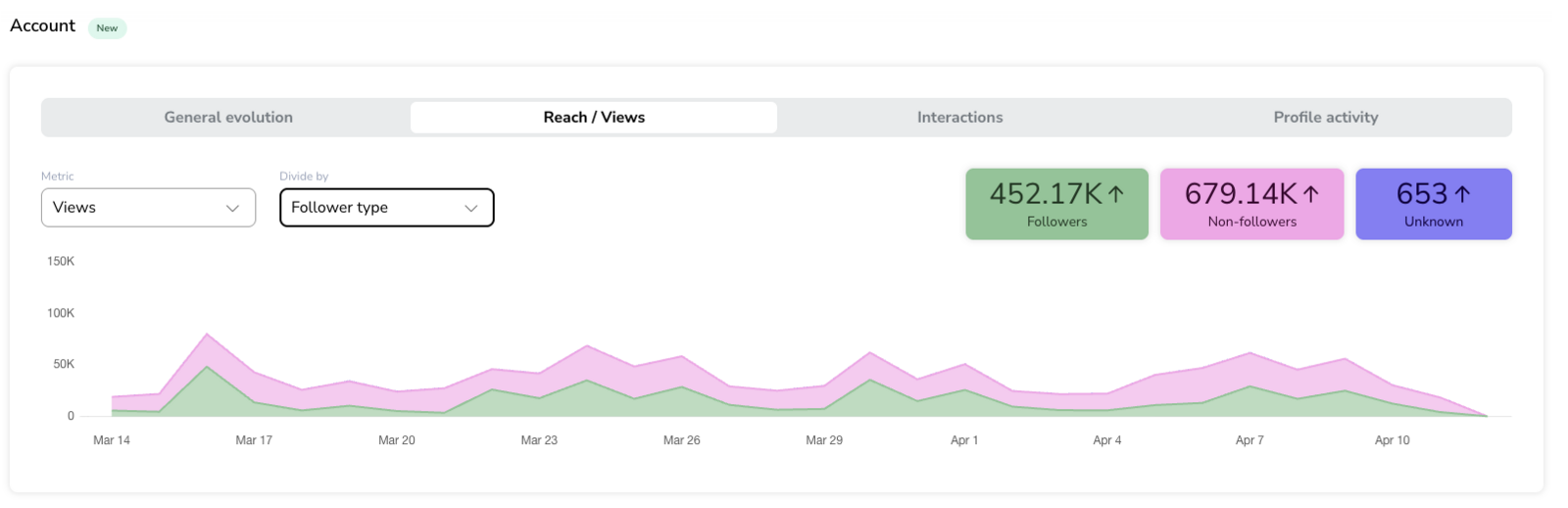
The Account section includes Instagram account-level analytics with breakdowns available in the current view.
For details on how this section works, including General evolution, Reach / Views, Interactions, and Profile activity, see 👉 Instagram Account metrics: breakdowns and charts
Posts published in period
✅ ORGANIC SUMMARY
Engagement: See section What is engagement?.
Interactions: Total number of interactions that occurred on all posts.
Average reach per post: Average number of people reached with your posts. The average is calculated across the number of posts. This data includes only organic reach. To see paid data, you must connect Meta Ads to access Instagram campaign metrics.
Views: Total number of times your posts were displayed. This data includes only organic views. To see paid data, you must connect Meta Ads and check your Instagram campaigns.
Posts: Total number of posts published in the selected period.
✅ ORGANIC INTERACTIONS
Likes: Total number of likes on posts.
Comments: Total number of comments on posts.
Saved: Number of times posts were saved.
Shares: Number of times posts were shared.
Posts: Total number of posts published in the selected period.
Reactions per post, Comments per post, and Shares per post: Average number of interactions per post included in the period.
Daily reactions, Daily comments, and Daily shares: Average number of interactions per day within the selected period.
✅ TYPES
Distribution of your posts by format — image or carousel — displayed as a donut chart or table.
✅ VIEWS
Breakdown of your posts' views by origin — Organic (Views) and Promoted (Views) — displayed as a donut chart or table. Promoted data requires a connected Meta Ads account
✅ LIST OF POSTS
Type: Type of post: image or carousel.
Date: Date the post was published.
Organic reach: Total number of people reached organically by the post.
Paid reach: Total number of people reached by the post through promoted content.
Organic Views: Total number of times the post was viewed organically.
Paid Impressions: Total number of times the post was displayed through promotion. Views are not available for paid content through the API.
Organic interactions: Total number of organic interactions on the post. Adds up the organic data of Likes, Comments, Shares, and Saves.
Paid interactions: Total number of paid interactions on the post. Meta Ads provides these data directly from the campaign, without detailed breakdown.
Organic likes: Total number of organic likes on the post.
Organic saved: Number of times the post was saved organically.
Organic shares: Number of times the post was shared organically.
Organic comments: Total number of organic comments on the post.
Organic Engagement: See section What is engagement?.
Paid post clicks: Total number of clicks received on the post through promotion.
Spent: Total amount spent on promoting the post.
New followers: Number of accounts that started following you because of that specific post. Available for feed posts only; not available for Reels or Stories.
To see paid data, you need to have the corresponding Meta Ads account connected to that brand.
✅ LIST OF HASHTAGS
Metrics for the hashtags used in your Feed posts (Reels data not included).
Organic views: Metrics showing the number of views the post received where that hashtag was used. If the hashtag was used in multiple posts, the value shown is an average.
Number of posts: Number of posts that include each hashtag.
Likes: Likes on publications that used each hashtag. If the hashtags have been included in several posts, the numbers will be averaged.
Comments: Number of comments on publications that used each hashtag. If they have been used in several publications, the numbers will be averaged.
Reels in the period
✅ ORGANIC SUMMARY
Engagement: See section What is engagement?.
Interactions: Total number of organic interactions on Reels. Includes Likes, Comments, Saved, and Shares.
Average reach/reel: Average number of people reached with your Reels. The average is calculated across the number of Reels. This data is organic only.
Views: Total number of times the Reel was played, including replays. Note: data before April 21, 2025 was recorded under a deprecated metric that excluded replays.
Reels: Total number of Reels published in the selected period.
✅ ORGANIC INTERACTIONS
Likes: Total number of likes on Reels.
Comments: Total number of comments on Reels.
Saved: Total number of times Reels were saved.
Shares: Total number of times Reels were shared.
Reels: Total number of Reels published in the selected period.
✅ LIST OF REELS
Date: Date the Reel was published.
Organic reach: Total number of people reached organically by the reel.
Paid reach: Total number of people reached by the reel through promotion.
Organic views: Total number of times the reel was played organically.
Paid views: Total number of times the reel was played through promotion.
Organic interactions:Total number of organic interactions on the reel. Adds up the organic data of Likes, Comments, Shares, and Saves.
Paid interactions: Total number of paid interactions on the reel. Meta Ads provides these data directly from the campaign, without detailed breakdown.
Organic Likes: Total number of organic likes on the reel.
Organic Saved: Number of times the reel was saved organically.
Organic Shares: Total number of times the Reel was shared organically.
Organic Comments: Total number of organic comments on the reel.
Organic Engagement: See section What is engagement?.
Paid Post Clicks: Total number of clicks received on the reel through promotion.
Spent: Total amount spent on promoting the reel.
Average watch time: The average amount of time spent playing the reel.
Total watch time: The total amount of time the reel was played, including any time spent replaying the reel. (This metric is marked by Meta as "in development").
Duration: Total duration of the Reel.
Retention (%): Indicates what percentage of the Reel's total duration was watched on average by users. It is calculated as
average watch time / Reel duration × 100.View rate (+3sec.): The percentage of viewers who watched the Reel past the first 3 seconds.
Reposts: Total number of times the Reel was reposted.
Stories published in period
✅ EVOLUTION
Impressions: Number of times that stories are shown.
Avg. reach per story: Average number of people reached per story.
Stories: Total number of stories published in the period selected.
✅ LIST OF STORIES
Date: Date of story publication.
Organic Reach: Total number of people reached organically by the story.
Paid Reach: Total number of people reached by the story through promotion.
Impressions: Total number of times the story was displayed. Views are not available for paid content through the API.
Organic Replies: Total number of replies on the story. Does not include reactions. Instagram does not provide data on organic replies to stories in Europe and Japan. See note in the Appendix.
Organic Taps back: Number of times users tapped back to replay the story.
Organic Taps forward: Number of times users tapped forward to skip the story.
Organic Exits: Number of times users stopped watching the story, for example by closing it or returning to the main feed.
Collaborations
The Collaborations section shows the posts you published in collaboration with other accounts and how they performed.
For details on how this section works, including Evolution and the list of collaborations, see 👉 Instagram Collaborations metrics
Competitors
✅ LIST OF COMPETITORS (SUMMARIZED MENU)
Followers: Total number of followers. Note: This metric is cumulative (lifetime) and not limited to the selected date range.
Posts: Total number of posts published by each competitor.
Reels: Total number of competitor's Reels in the time rage selected.
Likes: Average number of likes per post.
Comments: Average number of comments per post.
Engagement: See section What is engagement?.
✅ LIST OF COMPETITORS (MENU 'MORE STATS')
⚡️ Community
Followers: Total number of followers of our competitor.
Posts: Total number of posts of the competitor's account.
Reels: Total data of the competitor's Reels in the rank.
⚡️ Posts
Engagement: See section What is engagement?.
Likes: Total number of organic likes on posts in the selected time range.
Comments: Total number of organic comments from competitors in the selected time range.
Posts: Total number of publications made by the competitor's account in the selected time range.
⚡️ List of posts
Date: Date of publication of the post.
Likes: Total number of likes of the post.
Comments: Total number of comments of the post.
Interactions: Total number of interactions of the post.
Engagement: See section What is engagement?.
⚡️ Reels
Engagement: See section What is engagement?.
Likes: Total number of likes on posts in the selected time range.
Comments: Total number of comments from competitors in the selected time range.
Reels: Total number of Reels published by the competitor's account in the selected time range.
⚡️ List of reels
Date: Date of publication of the reel.
Likes: Total number of likes of the post.
Comments: Total number of comments of the post.
Interactions: Total number of interactions of the post.
Engagement: See section What is engagement?.
What is engagement?
Engagement measures how users interact with your content in relation to how visible or far-reaching it is.
In Metricool, you can choose between different calculation formulas.
For Instagram, the engagement shown in Metricool is always calculated using organic data.
Even if you connect your Meta Ads account to get promoted post data, this additional information does not affect the engagement calculation.
👉 The result is based exclusively on organic interactions (likes, comments, saves, etc.) in relation to the organic reach of your posts.
Note: The engagement of competitors is calculated differently from your own account. We recommend adding your own account as a competitor to make the data comparable.
Learn more here.
Appendix
Deprecated Metrics
As of January 8, 2025, Instagram has discontinued the following metrics in its API. If you had access to these metrics in Metricool before this date, you will still be able to view them for previous periods.
Profile Views: Visits to the profile of your Instagram account.
Website Clicks: Number of times the URL in the BIO of your account has been clicked.
Clicks: Section showing the clicks made on each button of the Instagram profile (Emails, directions, calls, and messages). You can check this in Instagram's profile activity statistics.
Meta Note: Privacy Update on Instagram Stories Interaction Metrics
Due to privacy rules, interactions with multimedia content on Instagram Stories related to user messages in certain regions will no longer be included in some result calculations. These regions include: Europe, starting December 1, 2020, and Japan, starting April 2021.
For stories created by users in the affected regions, the "replies" result will now return a value of 0.
For stories created by users outside the affected regions, the "replies" result will return the number of responses, but those from users in the affected regions will not be included in the calculation.