
TikTok Metrics
Updated 2 months ago
The data shown in Metricool comes from the official TikTok API and corresponds to the profile’s organic activity
Good to know
Personal vs business accounts: The metrics available for personal TikTok accounts are limited compared to business accounts, which allow access to more data.
For TikTok Business accounts, TikTok reports two types of videos:
Organic videos: posts visible on the public profile of the account.
Videos set as “Only show in ads”: posts used exclusively in ad campaigns that don’t appear on the public profile but are publicly accessible as ads.
Posts filtered due to violations: If a post doesn't appear in analytics, it may have been filtered by TikTok for issues like copyright infringement in music. In such cases, the TikTok API ignores the video, and it can't be retrieved from Metricool, as detailed in their official documentation.
Missing data due to video inactivity: If certain metrics such as reach or total watch time don't display data, it's likely that the video has been inactive for more than 7 days (no views, comments, likes, or shares). To recover data, interact with the video and wait 24–48 hours for the information to update.
Changing your account type: If you switch from personal to business (or vice versa) after connecting your account, not all previous data is guaranteed to display.
Below, you'll find all the available metrics for your TikTok account:
For date ranges, comparisons, charts, and CSV exports, see How to use and explore the Analytics tab.
If you hover over the arrow icon next to the numbers, it will show you the variation of the current period with respect to the previous period. For example, if you select a week, the result will compare to the previous 7 days.
Community
✅ GROWTH
Followers: total number of followers at the end of the selected time range.
Posts: total number of posts published in the selected time range.
✅ BALANCE OF FOLLOWERS
TikTok Business accounts show the Follower Change Breakdown: Acquired and Lost followers as two separate daily series, plus a Posts card for content published that day. TikTok personal accounts show the Net Follower Change instead.
See How the Follower Balance works across social networks for more details.
Demographics
The demographics section is only available for TikTok Business accounts. TikTok generates these insights only when the account has at least 100 followers.
If this minimum is not reached, the section will not appear in Metricool.
Available data:
Distribution by gender.
Followers by country.
You can view this information as a chart or a table inside Metricool.
Account
The account section is only available for TikTok Business accounts.
✅ PROFILE
Profile views: number of times your TikTok profile was visited during the selected period.
Posts: total number of posts published during the selected period.
✅ POSTS VIEWED IN PERIOD
This section includes posts that generated views during the selected period, regardless of when they were originally published.
Post views: total number of times your posts were viewed during the selected period.
Likes: total number of likes received on posts during the selected period.
Comments: total number of comments received on posts during the selected period.
Shares: total number of times posts were shared during the selected period.
Posts published in period
Shows the posts published within the selected time range. The data corresponds to the cumulative performance of each post, from its publication date up to yesterday. The time range filter only determines which posts are shown in the view, not the range of analyzed data.
ℹ️ Note: For personal accounts, this section displays limited information due to TikTok API restrictions.
✅ SUMMARY
Engagement: see the section What is engagement?.
Interactions: total interactions on posts.
Average reach/post: average reach per post.
Post views: total number of post views.
Posts: total number of posts published during the selected period.
✅ INTERACTIONS
Likes: total likes on posts.
Comments: total comments on posts.
Shares: total shares on posts.
Posts: total number of posts published during the selected period.
✅ IMPRESSIONS SOURCES
Percentage of where your post impressions come from.
For You: impressions generated from the For You page, where posts are shown based on user preferences and viewing behavior.
Following: impressions generated from the feed of users who follow you.
Profile: impressions generated when users visit your profile.
Search: impressions generated from the Discover page when the video appears in search results.
✅ AVERAGE VIDEO VIEWS
This data helps you understand the average watch time of your videos and the retention rate of your TikToks.
Average watch time/video: average time users spend watching your videos.
Average video length: average duration of your videos.
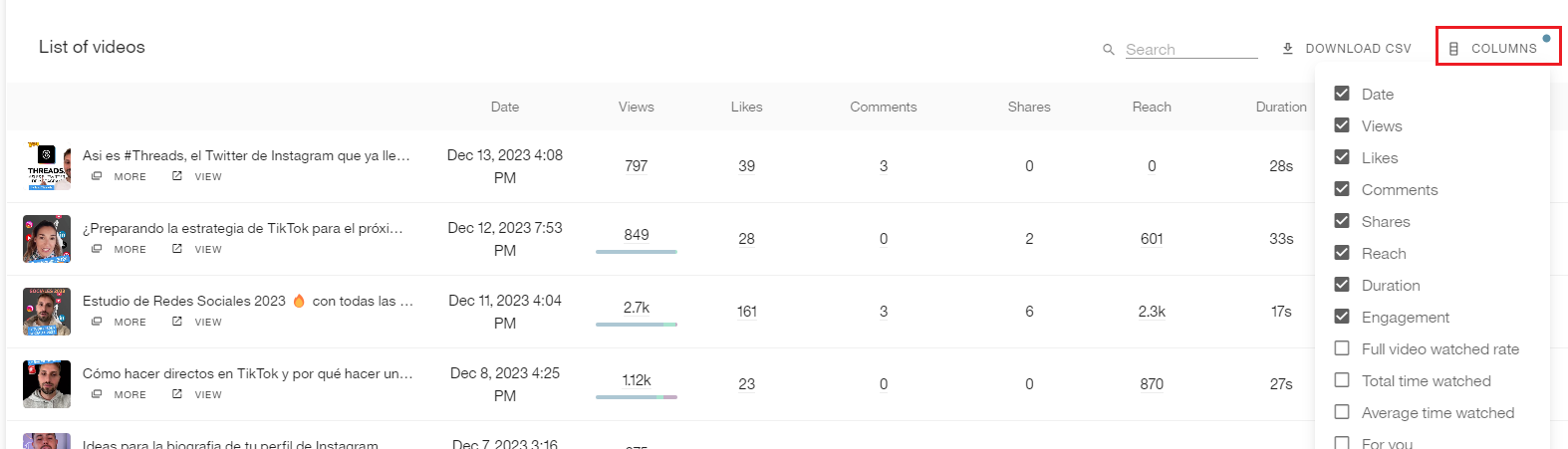
✅ LIST OF POST
Remember that image posts are only available for personal accounts. Check out the article Schedule and publish on TikTok.
Type: post type (image or video).
Date: date the post was published.
Views: total number of post views. Includes a breakdown of the percentage by source.
Likes: total number of likes on the post.
Comments: total number of comments on the post.
Shares: total number of times the post was shared.
Reach: total reach of the post.
Duration: duration of the post in seconds.
Engagement: see the section What is engagement?.
Full video views: percentage of views where the video was watched to the end.
Total watch time: total accumulated watch time of the post.
Average watch time: average watch time per view.
For You: percentage of views generated from the For You page.
Following: percentage of views generated from followers’ feeds.
Hashtag: percentage of views generated from a hashtag where the post appeared.
Sound: percentage of views generated from a sound used in the post.
Profile: percentage of views generated from profile visits.
Search: percentage of views generated from the Discover page when the post appeared in search results.
You can customize the metrics table by clicking on the columns. In Business accounts, more metric options are available.
What is engagement?
Engagement measures how users interact with your content based on its reach or visibility.
In Metricool, you can configure it using two different formulas.
Note: Engagement for competitors is calculated differently from your own account.
We recommend adding your own account as a competitor to make the data comparable.
See all the details here.