
What you can do in bulk with your posts
Planning > List lets you select several posts and apply one action to all of them, instead of opening each post one by one. This article lists the bulk actions available in List, plus other tools that let you act on several posts at once. To get started, go to Planning > List, check the boxes next to the posts you want to update, and choose an action from the toolbar that appears.
Bulk actions in List view
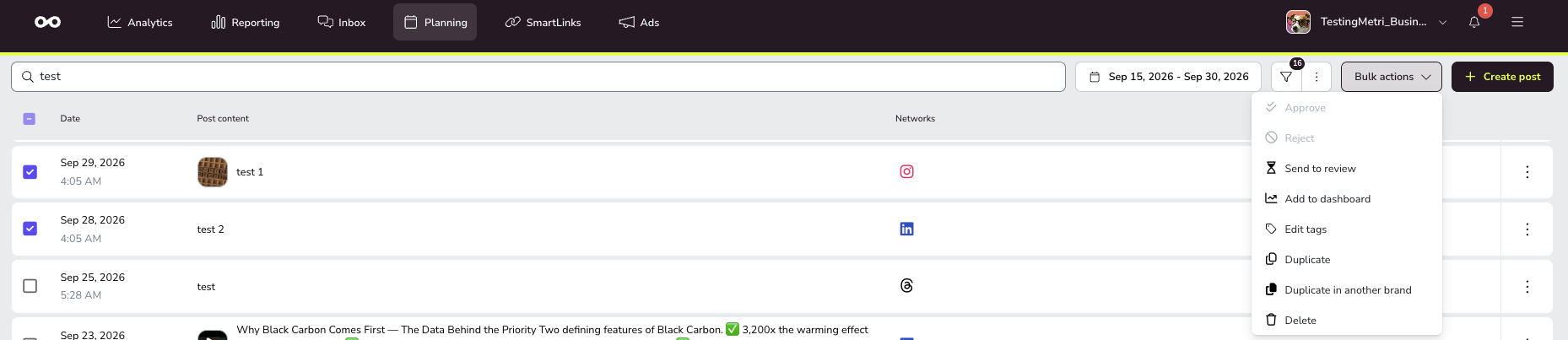
Action | What it does | More details |
|---|---|---|
Duplicate | Duplicate the selected posts within the same brand, as Drafts or as Scheduled posts. | |
Duplicate to another brand | Copy the selected posts into one or more other brands you manage. | |
Send for review | Submit several posts for approval in one action. Available on the Advanced and Custom plans. | How to send posts for review with Metricool's approval system |
Approve / Reject | Approve or reject several posts at once. You can only act on posts assigned to you for review. Available on the Advanced and Custom plans. | |
Delete | Delete several posts at once. Deleting a published post removes it from Metricool only; delete it from the social network separately. | |
Add to campaign dashboard | Add several scheduled posts to a Campaign Dashboard at once. | |
Add or remove tags | Add or remove tags on several items at once. Works on any post, including published and failed ones. |
Other ways to handle many posts at once
Metricool's MCP and a CSV file also let you act on several posts at once. Both can replicate most of List's bulk actions, and go beyond them: for example, moving several Draft posts to Scheduled, or switching several posts from manual to auto-publishing, cases List doesn't support in bulk.
Ask Metricool's MCP. Connect an AI assistant such as Claude or ChatGPT to act on several posts through a conversation, including moving several Drafts to Scheduled. See More scheduling options with Metricool's MCP.
Import or export by CSV. Create, update, or move large batches of posts through a CSV file, including re-importing Drafts as Scheduled posts or switching several posts to auto-publishing. See How to schedule posts in batch with a CSV file in Metricool and How Planning settings work.
If you want to schedule repeating or evergreen content from scratch rather than duplicating existing posts, you can set up a recurring post or queue an Autolist to recycle content automatically.
Related articles